How to Fill Out a Timesheet (with Free Template)
 By Suraj Rao10 min read
What You'll Learn
- A complete timesheet line has a date, client or project, task, start and end times, breaks, a total and a billable flag.
- Filling in your timesheet every day, not on Friday from memory, is the single biggest fix for missing hours.
- Once you bill several clients, a timer that writes the timesheet for you is more accurate than any spreadsheet.

To fill out a timesheet, write one line for each block of work: the date, the client or project, the task, your start and end times, any unpaid break, and the total hours. Mark each line billable or not, add up the week, check it, and submit it for approval or turn it into an invoice.
That's the whole job. The details are where people slip: rounding, forgotten breaks, and weeks rebuilt from memory on a Friday afternoon.
This guide shows how to fill out a timesheet step by step, with a filled-in example week, the difference between daily and weekly timesheets, how approval works and the mistakes to avoid. It works whether you're an employee, a freelancer or part of an agency team.
What goes on a timesheet
Every timesheet, paper or digital, needs the same few fields. Leave one out and someone will have to ask you about it later.
| Field | What to write | Example |
|---|---|---|
| Date | The day the work happened | Mon 2 Nov |
| Client or project | Who the work was for | Northwind Studio, Website redesign |
| Task | What you did, in a few words | Homepage wireframes |
| Start time | When you started | 09:00 |
| End time | When you stopped | 12:30 |
| Break | Unpaid time taken in the middle | 0:15 |
| Total | End minus start minus break | 3.25 |
| Billable | Whether the client pays for it | Yes |
A few notes on the fields:
- Client or project. Employees on one team may only need a project or cost code. Freelancers and agencies need the client, because that's who gets the invoice.
- Task. "Design" tells nobody anything. "Homepage wireframes, round 2" tells your client exactly what they're paying for.
- Total. Write it in decimal hours (3.25, not 3:15) if the number feeds a payroll or invoice calculation. Our guide on how to calculate hours worked has a full minutes-to-decimal table.
- Billable. Admin and proposal writing are usually non-billable. Record them anyway.
How to fill out a timesheet, step by step
Here's the routine that keeps a timesheet accurate with the least effort.
1. Start from the right template
Use one sheet per week, with the fields above as columns. If your employer or client gives you a format, use theirs. If not, download our free timesheet template: it's an Excel file that works out each line's hours from start and end times and adds up the total and billable hours for the week. It opens in Google Sheets too.
2. Fill in your name and the week
At the top, write your name, the week's start and end dates and, if you work for several clients, who the sheet will go to.
3. Log each block of work as you go
When you switch tasks, write a new line with its start time, and the end time when you stop. One line per task, not per day, is what makes a timesheet useful later.
4. Record breaks separately
Lunch, a school run, a long phone call that wasn't work: put it in the break column rather than shortening the end time. Under US federal rules, short rest breaks (usually 20 minutes or less) count as hours worked, while a real meal break of 30 minutes or more, where you're fully off duty, generally doesn't, according to the US Department of Labor's guidance on hours worked. Rules differ by country and state, so check your own.
5. Work out each line's total
Total = end time minus start time minus break. 09:00 to 12:30 with a 15-minute break is 3 hours 15 minutes, or 3.25 hours. The free timesheet calculator does this for a full week, including shifts that run past midnight.
6. Mark billable or non-billable
Do it on the day, while you remember whether that call was for the client or for you.
7. Add up the week and check it
Total the hours and the billable hours. Then read the sheet against your calendar: does Tuesday look short? Is there a meeting with no line?
8. Submit it, or bill it
Employees submit the timesheet to a manager. Freelancers and agencies use it to build the invoice, often attaching a time report so the client sees what they're paying for.
A filled-in example: one week for a freelance designer
Here's a real-looking week for a freelance designer with four clients. Times are in 24-hour format and totals are in decimal hours.
| Day | Client / project | Task | Start | End | Break | Hours | Billable |
|---|---|---|---|---|---|---|---|
| Mon | Northwind Studio / Website redesign | Homepage wireframes | 09:00 | 12:30 | 0:00 | 3.50 | Yes |
| Mon | Internal | Invoicing and email | 13:30 | 14:15 | 0:00 | 0.75 | No |
| Mon | Brightpath / Client portal | UI review | 14:15 | 17:15 | 0:15 | 2.75 | Yes |
| Tue | Brightpath / Client portal | Design system components | 09:00 | 13:00 | 0:00 | 4.00 | Yes |
| Tue | Northwind Studio / Website redesign | Feedback call | 14:00 | 15:00 | 0:00 | 1.00 | Yes |
| Tue | Lumen Labs | Proposal writing | 15:00 | 16:30 | 0:00 | 1.50 | No |
| Wed | Atlas Digital / Mobile app UI | Onboarding screens | 09:30 | 13:00 | 0:15 | 3.25 | Yes |
| Wed | Northwind Studio / Website redesign | Homepage revisions | 14:00 | 16:00 | 0:00 | 2.00 | Yes |
| Thu | Fernwood Co / SEO retainer | Monthly report | 09:00 | 11:15 | 0:00 | 2.25 | Yes |
| Thu | Atlas Digital / Mobile app UI | Developer handoff | 11:15 | 13:15 | 0:00 | 2.00 | Yes |
| Thu | Internal | Portfolio update | 14:00 | 15:00 | 0:00 | 1.00 | No |
| Fri | Brightpath / Client portal | Bug fixes | 09:00 | 12:00 | 0:00 | 3.00 | Yes |
| Fri | Internal | Bookkeeping | 13:00 | 14:00 | 0:00 | 1.00 | No |
Week total: 28.00 hours. Billable: 23.75 hours. Non-billable: 4.25 hours.
Written down, it shows Northwind took 6.5 hours this week, ready to compare with the estimate, and that about 15% of the week went on unpaid work. Our complete guide to billable hours covers how to read that ratio.
Daily vs weekly timesheets
A daily timesheet covers one day and is filled in and often submitted that day. A weekly timesheet covers seven days on one sheet and is submitted once a week.
| Daily timesheet | Weekly timesheet | |
|---|---|---|
| Best for | Shift work, contractors paid daily, jobs billed by the day | Most office work, freelancers, agencies |
| Accuracy | High: written while the day is fresh | High if you fill it in daily, low if you fill it in on Friday |
| Admin | More sheets to file and approve | One sheet per person per week |
| Billing | Easy to bill day rates | Matches weekly or monthly invoicing |
For most freelancers and agency teams, the best of both is a weekly timesheet that you fill in daily.
Common timesheet mistakes (and how to avoid them)
Filling it in on Friday from memory
This is the big one. By Friday, the short tasks have vanished: the 20-minute call, the quick fix. Those are exactly the billable minutes that add up. Fill the sheet in at the end of each day, or better, as you switch tasks.
Rounding every entry up (or down)
Rounding each line to the nearest hour makes a timesheet look tidy and wrong. If you round, round consistently, to a small increment such as 6 or 15 minutes, and say so in your contract. For employees in the US, federal rules accept rounding to the nearest 5, 6 or 15 minutes only if it averages out over time and doesn't leave people underpaid (29 CFR 785.48).
Forgetting breaks
Leaving out an hour-long lunch adds an hour you didn't work. Use the break column.
Vague task descriptions
"Work" and "misc" invite questions from clients and approvers. Write what you did in a few words a client would understand.
Editing approved or invoiced time
Once a timesheet is approved or billed, it's a record. If something was wrong, add a correcting entry and tell the approver, rather than quietly changing the old one.
How timesheet approval works
In most teams, approval follows the same simple flow:
- Submit. At the end of the week (or day), you submit your timesheet.
- Review. A manager, project lead or client checks the hours against what they expected: the plan, the project estimate, the work delivered.
- Approve or send back. If something looks off, the reviewer sends it back with a question, you fix it and resubmit.
- Lock. Approved hours are locked and go to payroll or onto an invoice.
For freelancers, the client is the approver, and the "approval" usually happens when they accept the invoice. Sending a clear time report with the invoice makes that quick: they can see every date, task and total without asking.
When a time tracker beats a paper or spreadsheet timesheet
A paper or spreadsheet timesheet is fine when you work for one employer, on one project, with regular hours. It starts to creak when:
- you work for several clients and switch between them during the day;
- you bill by the hour and every missed 15 minutes is money;
- you have a team and spend Friday chasing everyone's sheets;
- clients ask for proof of the hours you're billing;
- you copy hours from the timesheet into an invoice by hand.
That's where a time tracker earns its place: you start a timer on a client, project and task, and it writes the timesheet line for you.
In Tristiks Grow's timesheets, every hour from the OneTrack desktop app, the web timer or a manual entry lands on one timesheet per client. Each entry has its project, task and a billable or non-billable flag. When you build an invoice, you pick the billable hours, and those entries are locked so no hour is billed twice.
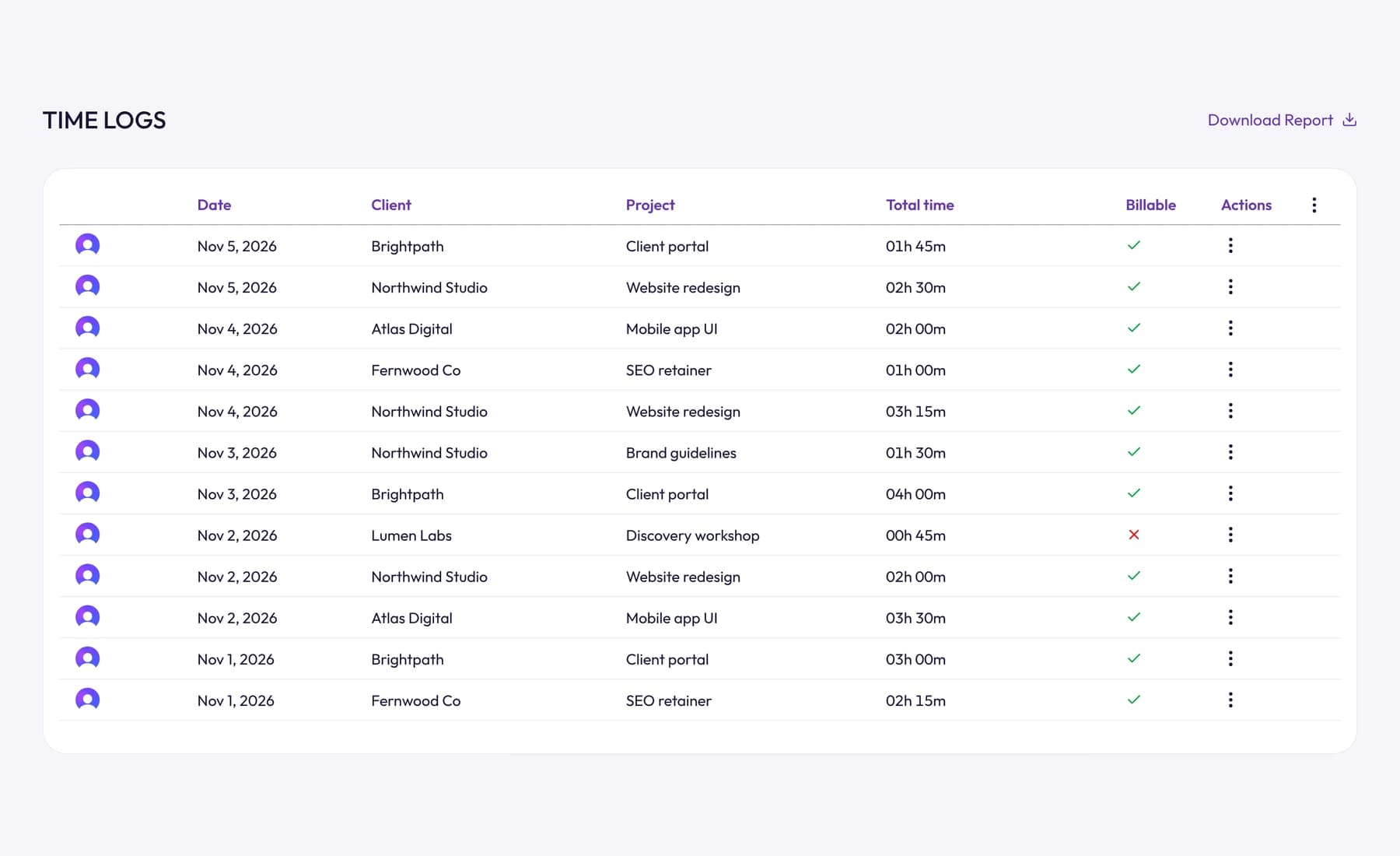
Forgot to start the timer? You can still add an entry by hand, as a length of time or with start and end times. And if a client wants the detail, you can download a PDF time report for any date range.
For more on choosing a method, see our comparison of seven ways to track your time at work.
Frequently asked questions
How do I fill out a timesheet for the first time?
Write one line per block of work with the date, client or project, task, start time, end time and break. Work out each line's hours (end minus start minus break), add up the week, check it against your calendar and submit it. Fill it in daily so nothing goes missing.
Should a timesheet be in hours and minutes or decimal hours?
Use decimal hours (7.5) for anything that feeds a pay or invoice calculation, because 7:30 multiplied by a rate gives the wrong answer in most spreadsheets. Hours and minutes are fine for reading. Fifteen minutes is 0.25, thirty is 0.5 and forty-five is 0.75.
Do breaks count on a timesheet?
Record every break, then follow your local rules on which ones are paid. In the US, short rest breaks usually count as hours worked and bona fide meal breaks of 30 minutes or more usually don't. For freelancers, a break is simply time you don't bill.
What happens if I make a mistake on my timesheet?
If it isn't submitted yet, fix it. If it's already approved or invoiced, tell your manager or client and add a correcting entry rather than editing the original. That keeps the record honest for both sides.
Wrap up
Filling out a timesheet takes a few minutes a day if you log as you go: one line per task, breaks in their own column, totals in decimal hours and a billable flag on everything.
Start with our free timesheet template, and when you're tired of filling it in, let Tristiks Grow's timesheets fill themselves as you work.
This post is general information, not legal or payroll advice. Rules on breaks, rounding and overtime vary by country and state.
Category: Time Tracking
Suraj Rao
Suraj Rao is the founder of Tristiks, the team behind Tristiks Grow and its desktop time tracker OneTrack. He writes about time tracking, client work and getting paid, and about DevOps, cloud and AI from years of building software.