The Complete Guide to Billable Hours
 By Suraj Rao14 min read
What You'll Learn
- Billable hours are the hours spent on work a client has agreed to pay for, and your contract should say exactly what counts.
- Your utilization rate is billable hours divided by available hours; professional services benchmarks put the target around 70 to 80%, and solo freelancers usually land lower.
- Tracking time as you work, in small consistent increments, raises your billable share more reliably than working longer days.

Billable hours are the hours you spend on work a client has agreed to pay for, charged at your hourly rate. Non-billable hours are everything else that keeps the business running: admin, sales, invoicing, learning. The share of your working time that's billable decides how much you earn from the hours you put in.
If you bill by the hour, billable hours are your revenue. If you charge fixed prices, they tell you whether the price was right. Either way, the hours you don't track are hours you can't bill or learn from.
This guide covers what counts as billable, how to calculate your utilization rate, realistic targets, how to track and round billable time, how to show it on an invoice and how to raise your billable share without working longer days.
What are billable hours?
A billable hour is an hour of work you can charge a client for. It's time spent directly on their project, at the rate you agreed: designing their homepage, writing their report, fixing their bug, sitting in their workshop.
Non-billable hours are the time you work but can't charge to anyone. You still need them, because without sales there's no next client and without invoicing there's no money, but they come out of your margin.
The split matters because your rate has to cover both. If you charge $100 an hour but only half your working week is billable, you're really earning $50 for every hour you work.
Billable vs non-billable work: examples
What counts as billable depends on your contract, so the first rule is: agree it in writing before the work starts. That said, here's how most freelancers and agencies split it.
| Usually billable | Usually non-billable | Depends on the contract |
|---|---|---|
| Design, writing, development, analysis for the client | Writing proposals and pitching | Travel to the client's office |
| Client meetings and calls about the project | Invoicing and bookkeeping | Email and Slack with the client |
| Research specific to the client's project | Your own marketing and portfolio | Revisions beyond the agreed rounds |
| Project management for that client | General training and learning | Onboarding and setup time |
| Revisions within the agreed scope | Internal team meetings | Waiting on the client (on-call time) |
| Preparing deliverables and handover | Tool setup and IT problems | Quick questions after the project ends |
The gray areas
The right-hand column is where most billing disputes start. A few common calls:
- Client communication. Many agencies bill for meetings and calls but not short emails. Others bill everything, in small increments. Either is fine if the client knows.
- Travel. Common approaches: bill it in full, bill it at a reduced rate, or don't bill it but charge expenses. Write down which.
- Learning. Learning a tool you'll use for every client isn't billable. Researching the client's industry for their project usually is.
- Fixing your own mistakes. Most professionals don't bill a client for redoing work that was wrong the first time. It builds trust and it's fair.
Even non-billable time is worth recording. It's the only way to see that proposals take you six hours each, or that one client's "quick questions" cost you a day a month.
A sample billable time clause
Here's a plain-English clause you can adapt for a proposal or contract. Change the details to match how you work.
Billable time
We bill for time spent on your project, including design, development,
research, project management, and calls and meetings with your team.
Time is recorded against tasks and rounded up to the nearest 15 minutes
per entry. Email replies under 10 minutes are not billed.
Travel is billed at 50% of the hourly rate; travel expenses are billed
at cost. Work outside the agreed scope is quoted and approved in
writing before it starts. Hours are invoiced monthly with a time report.
The point isn't the specific choices. It's that the client reads them before the first invoice, not after.
Why billable hours matter, even on fixed-price work
On hourly work, the link is direct: billable hours × rate = revenue. Miss 30 minutes a day and, over a year, you've given away weeks of work.
On fixed-price and retainer work, billable hours tell you whether you priced it right. If a $6,000 website took 40 hours, you earned $150 an hour. If it took 80, you earned $75, and the next quote needs to change. Our guide to retainers vs fixed-price projects goes deeper on pricing each model.
Tracked billable hours also help you:
- set your rate, because you know how many hours a year you can really bill;
- spot scope creep while there's still time to talk to the client;
- answer billing questions with a record instead of a guess;
- decide which clients to keep, by comparing what each one pays per hour of your time.
How to calculate your utilization rate
Your utilization rate is the share of your available working time that's billable:
Utilization rate = billable hours / available hours x 100Available hours are the hours you're working, or expected to work, in the period. For an employee that's usually contracted hours minus holidays. For a freelancer, it's the hours you actually work.
Worked example: one week
A freelance developer works 40 hours this week. Their timesheet shows:
| Work | Hours | Billable? |
|---|---|---|
| Client A: feature development | 18 | Yes |
| Client B: bug fixes and code review | 7 | Yes |
| Client calls (both clients) | 3 | Yes |
| Proposal for a new client | 4 | No |
| Invoicing, email, bookkeeping | 5 | No |
| Learning a new framework | 3 | No |
| Total | 40 | 28 billable |
Utilization rate = 28 ÷ 40 × 100 = 70%.
Worked example: a small team
An agency of four people is available for 160 hours in a week. Between them they log 104 billable hours. Team utilization is 104 ÷ 160 × 100 = 65%. Look at each person, too: a designer at 85% and a lead at 40% average out to something that hides both a burnout risk and a sales bottleneck.
Utilization vs realization
Utilization tells you how much time was billable. It doesn't tell you how much was billed or paid. That's realization: the share of billable time that actually makes it onto an invoice at full rate. Hours written off, discounted or never invoiced lower it. Track both: a 75% utilization rate is worth little if a quarter of those hours never get billed.
What's a good billable hours target?
It depends on your role and your business, so treat any benchmark as a range, not a rule.
For professional services firms (consultancies, agencies, IT services), SPI Research's annual benchmark describes 75% billable utilization as the industry standard, with 70 to 80% historically the range that maximized profitability. It also reports that average utilization has fallen below that: to 68.9% in its 2025 benchmark (SPI Research: the truth about billable utilization), and to 66.4% for 2025 in its 2026 benchmark, according to Deltek's summary of the report. The same research notes that pushing people above 80% tends to bring burnout and attrition.
Those figures describe employees inside firms with salespeople and finance teams. Solo freelancers do their own sales, admin and invoicing, so their billable share is usually lower. The right target is the one your rate is built on.
Turning a percentage into hours
Here's what common targets mean over a year for someone working 40 hours a week for 46 weeks (52 weeks minus 6 for holidays, public holidays and sick days):
| Utilization | Billable hours per week | Billable hours per year |
|---|---|---|
| 50% | 20 | 920 |
| 60% | 24 | 1,104 |
| 70% | 28 | 1,288 |
| 75% | 30 | 1,380 |
| 80% | 32 | 1,472 |
Compare that with the 2,080 hours (40 × 52) people often divide a salary by. If you set your rate on 2,080 billable hours a year, you'll fall short. The freelance hourly rate calculator works from the hours you can really bill, and our guide on how to calculate your hourly rate walks through the formula.
How to track billable hours
Accurate billable hours come from a few habits, not from willpower.
- Agree what's billable first. Put it in the contract or proposal: which work, which rate, what increment, whether travel and calls count.
- Track in real time. Start a timer when you start a task and stop it when you switch. Time reconstructed at the end of the week always comes out short.
- Track against a client, project and task. "4 hours, Client A" is a guess. "4 hours, Client A, checkout redesign, payment form" is a record.
- Flag each entry billable or non-billable as you go, while you still remember what the call was about.
- Record non-billable time too. Otherwise your utilization rate is fiction.
- Review weekly. Check the week against your calendar, fix gaps and add anything you forgot.
A 10-minute weekly billable hours review
Every Friday, or first thing Monday, run through this list:
- Does every day have entries, and does each day's total look right?
- Is there a meeting or call in the calendar with no time entry?
- Is every entry assigned to a client, project and task?
- Is every entry flagged billable or non-billable correctly?
- Were there timers left running over lunch or overnight?
- Is any project running ahead of its estimate?
- What was this week's utilization rate, and why was it higher or lower than usual?
The last question is the useful one. A low week is fine; a low month you didn't notice is not.
Our step-by-step guide on how to fill out a timesheet has a filled-in example week, and our comparison of seven ways to track your time at work covers paper logs through to automatic trackers.
Using a time tracker
Spreadsheets work, but they rely on you remembering to write things down. A timer does the writing for you.
In Tristiks Grow, you start the timer in the OneTrack desktop app or the web timer, pick the client, project and task, and every minute lands on that client's timesheet. Each entry is marked billable or non-billable, so only the hours you mean to charge reach an invoice. If you forget to start the timer, add the entry by hand afterwards.
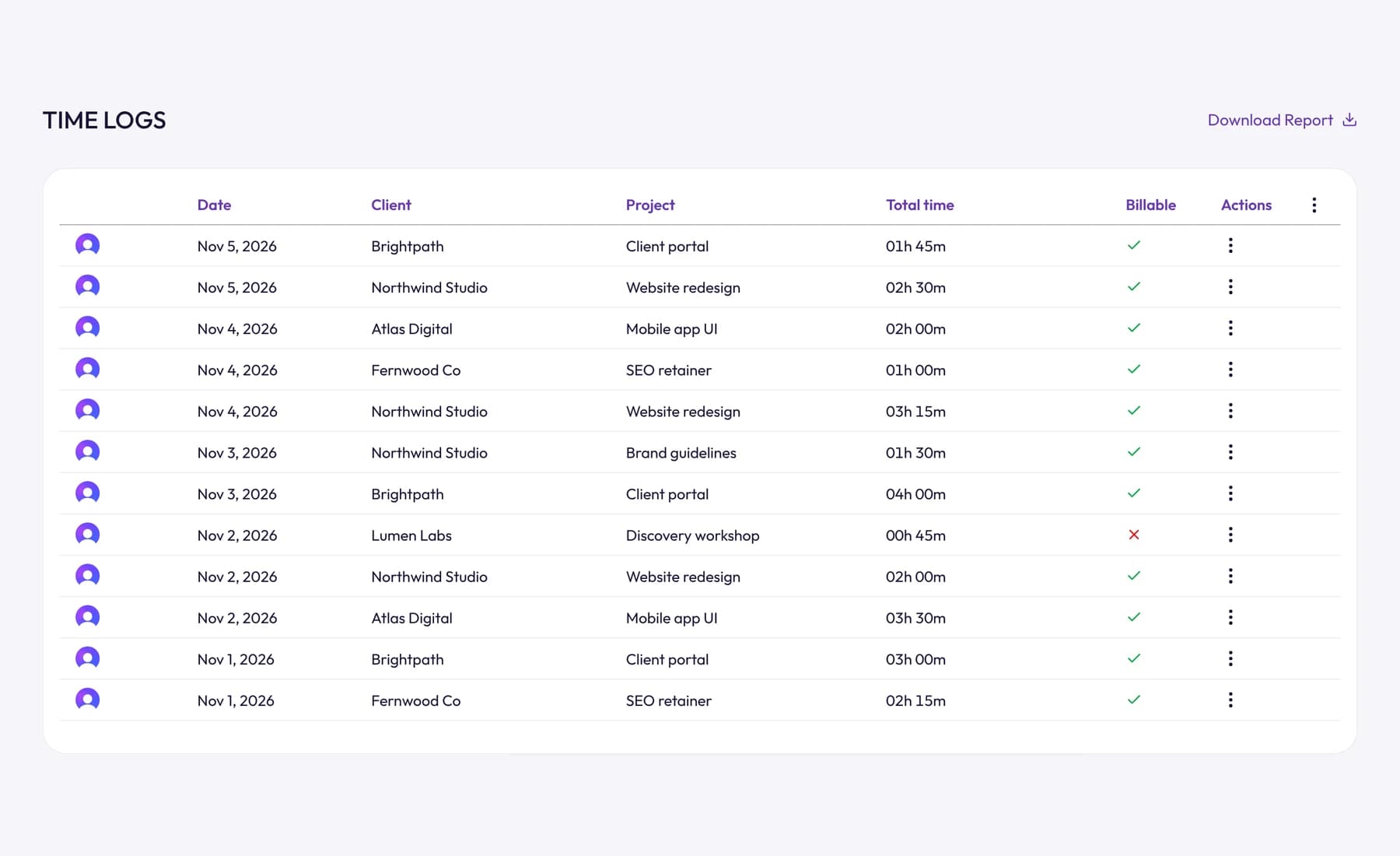
You can save each client's hourly rate on their profile, and time reports use it to show what your hours earned before you invoice.
Don't bill the coffee break
The other side of accuracy is not billing time you weren't working. If you leave a timer running through lunch, that hour shouldn't reach the invoice.
OneTrack watches for that: after 3, 5, 10 or 15 minutes without keyboard or mouse input (you choose), it tells you how long you've been away, and when you're back you keep the time or discard it. A call or a whiteboard session away from the keyboard can still be kept. Our guide to idle time explains how this works and why it matters for billing.
Rounding and minimum billing increments
Few people bill to the exact minute. Most pick a billing increment and round each entry to it. The common ones:
| Increment | As decimal | Typical users |
|---|---|---|
| 6 minutes | 0.1 hours | Lawyers, accountants, consultants who bill many short tasks |
| 15 minutes | 0.25 hours | Freelancers and agencies |
| 30 minutes | 0.5 hours | Consultants with longer sessions |
| 1 hour | 1.0 hours | Workshops, on-site work, minimum charges |
How much rounding changes the bill
Take a 22-minute call at $100 an hour, rounded up to the next increment:
| Increment | Billed time | Billed amount |
|---|---|---|
| Exact | 0.37 hours | $36.67 |
| 6 minutes | 0.4 hours | $40.00 |
| 15 minutes | 0.5 hours | $50.00 |
| 1 hour | 1.0 hours | $100.00 |
One call doesn't matter. Ten short entries a day, each rounded up by an average of 7 minutes, add more than an hour to the day's bill. That's where clients start asking questions.
Rounding fairly
- Pick one increment and state it in your contract or proposal.
- Apply it the same way every time. If you round up, round the entry, not the day's total, and don't round twice.
- Use a small increment for short tasks. If your day is full of 5-minute fixes, 15-minute rounding inflates the bill.
- Consider a minimum charge instead for things like ad hoc calls, and say so up front.
If you round employees' clock-in times for payroll, different rules apply. In the US, rounding must average out so people aren't underpaid over time (29 CFR 785.48). This is general information, not legal or payroll advice.
How to show billable hours on an invoice
An invoice for billable hours should let the client check the bill without asking you anything. Include:
- the billing period (for example, 1 to 31 October);
- one line per task or project, with a plain description of the work;
- the hours for each line, in decimal;
- the rate and the amount (hours × rate);
- the subtotal, tax and total;
- the payment terms and how to pay.
Here's what the lines might look like:
| Description | Hours | Rate | Amount |
|---|---|---|---|
| Website redesign: homepage wireframes | 6.50 | $90.00 | $585.00 |
| Website redesign: design revisions, round 2 | 4.25 | $90.00 | $382.50 |
| Feedback calls (3) | 2.00 | $90.00 | $180.00 |
| Total | 12.75 | $1,147.50 |
Group lines by task when the client wants detail, or by project when they want a short invoice. For clients who want to see every entry, attach a time report for the period.
Two things to avoid: billing the same hour twice and forgetting hours altogether. Both happen when you copy hours from a spreadsheet into an invoice by hand. In Tristiks Grow's invoicing, you pick a client and the tracked hours to bill, and they're added as line items at your rates. Once an entry is on an invoice it's locked, so it can't be billed again. Our guide on how to write an invoice covers the rest of the invoice.
How to increase your billable hours (without working longer)
Raising your billable share usually isn't about more hours. It's about capturing the billable work you already do and shrinking the non-billable work around it.
1. Capture the small stuff
The biggest gain for most people is time they already did but never recorded: the 15-minute call, the quick fix, the email that took half an hour to write. Track as you go and these stop disappearing.
2. Bill for what the contract allows
If your contract says client meetings are billable, bill them. Many freelancers under-bill out of habit, not because the client objected.
3. Turn extras into change requests
Work outside the agreed scope isn't free just because it's small. Log it, quote it and get a yes before you do it. Our guide to scope creep has a script for that conversation.
4. Batch your admin
Answer email at set times, invoice once a week and do your bookkeeping in one block. Admin spread through the day costs more than its own minutes, because every switch costs you focus.
5. Use templates
Proposals, contracts, invoices and onboarding emails take far less time from a template. That non-billable time comes straight back.
6. Cut internal meetings
Look at last month's non-billable hours. If internal meetings are near the top, shorten them, make some async, or drop the ones nobody would miss.
7. Watch your estimates
Compare tracked time with the estimate on every project. If a type of job always runs 30% over, price it higher next time, so the extra hours are paid. Our guide to project budgets shows how to keep track.
8. Raise your rate before you raise your hours
If you're already near your sustainable target, more billable hours means longer days. A higher rate on the same hours doesn't.
Frequently asked questions
What counts as billable hours?
Billable hours are time spent on work a client has agreed to pay for: the project work itself, plus anything your contract says is billable, such as meetings, research or travel. Admin, sales, invoicing and general learning are usually non-billable.
How many billable hours a year is normal?
A full-time year is 2,080 hours (40 × 52), but nobody bills all of it. Take off six weeks for holidays and sick days and you have about 1,840 available hours; at 60 to 80% utilization, that's roughly 1,100 to 1,470 billable hours. Your own tracked time is the best guide.
What is a good utilization rate?
For professional services firms, SPI Research describes 75% as the industry standard, with 70 to 80% historically the most profitable range. Freelancers who do their own sales and admin usually aim lower. Above about 80%, burnout becomes a real risk.
Is answering client emails billable?
It can be, if your contract says so. Some professionals bill every email in small increments; others include short emails in their rate and bill only calls and meetings. Decide, write it down and tell the client.
What's the difference between hours worked and billable hours?
Hours worked is all the time you spent working. Billable hours are the part of it you can charge a client for. The ratio between them is your utilization rate. To work out hours worked from start and end times, see our guide on how to calculate hours worked.
Wrap up
Billable hours come down to four things: agree what counts, track it as you work, round it consistently and put every hour on an invoice. Watch your utilization rate over time, and you'll know whether to raise your rate, cut admin or find more work.
To stop billable time slipping through the gaps, try Tristiks Grow's timesheets, which fill themselves as you track and turn into invoices.
Category: Time Tracking
Suraj Rao
Suraj Rao is the founder of Tristiks, the team behind Tristiks Grow and its desktop time tracker OneTrack. He writes about time tracking, client work and getting paid, and about DevOps, cloud and AI from years of building software.