Onboarding a New Client: A Step-by-Step Checklist
 By Suraj Rao9 min read
What You'll Learn
- A client onboarding checklist runs from signed contract to first deliverable: deposit, client setup, welcome email, intake questionnaire, access and assets, kickoff call and a communication plan.
- Don't start work until the contract is signed and the deposit is paid; send the deposit invoice the same day the contract comes back.
- A 45-minute kickoff call with a fixed agenda, followed by a written recap, prevents most of the misunderstandings that derail new projects.

A client onboarding checklist is the list of steps you run between a signed contract and the first deliverable: the deposit, a welcome email, an intake questionnaire, access to their accounts and assets, a kickoff call and a communication plan. Running the same steps for every new client makes them feel looked after and stops projects starting on the wrong foot.
The first two weeks set the tone for the whole relationship. A client who gets a clear welcome, a well-run kickoff and a first update on the day you promised stops worrying about whether they hired the right person.
Below is a step-by-step client onboarding checklist for freelancers and agencies, with a sample welcome email, intake questions, a kickoff agenda and a copy-ready version of the whole checklist at the end.
The client onboarding checklist at a glance
| Step | When | Done when |
|---|---|---|
| 1. Confirm the contract is signed | Day 0 | You have a signed contract and proposal |
| 2. Send the deposit invoice | Day 0 | The invoice is sent |
| 3. Set the client up in your system | Day 0 | Their profile, project and tasks exist |
| 4. Send the welcome email | Day 0 to 1 | The client knows what happens next |
| 5. Send the intake questionnaire | Day 1 | Answers are back |
| 6. Collect access and assets | Days 1 to 5 | You can log in to everything you need |
| 7. Run the kickoff call | Days 3 to 7 | Goals, roles and dates are agreed |
| 8. Agree the communication plan | At kickoff | The plan is in writing |
| 9. Plan the first deliverable | After kickoff | Tasks have owners and due dates |
| 10. Check in after the first deliverable | Weeks 2 to 3 | You've asked how it's going |
Here's each step in detail.
Step-by-step client onboarding
1. Confirm the contract is signed
Don't start work, not even "a quick look", until the contract and proposal are signed. Starting early teaches the client that paperwork is optional, and leaves you unprotected if the project falls through.
Check that the signed version includes the scope, price, payment schedule, revisions and how changes are handled. If you're not sure what should be in it, see what to include in a freelance contract.
If you send them from proposals and contracts in Tristiks Grow, you can see when each one was viewed and signed, and the signed version is locked so it can't change.
2. Send the deposit invoice
Send the deposit or first invoice the same day the contract comes back, while the client is most engaged. State clearly that work starts once it's paid.
If the project is split into payments, set them all up now so you don't have to remember the second and third invoices later. In Tristiks Grow you can split a job into scheduled payments, each with its own amount, send date and terms, such as a deposit now and the balance on delivery. For monthly work, a recurring invoice goes out on its own schedule. Our guide to writing an invoice covers what each one should include.
3. Set the client up in your system
Create one record for the client before any files or emails start flying around:
- company name, address and website;
- contacts, with who approves work and who pays invoices;
- billing details: rate, currency, tax rate and payment terms;
- the signed proposal and contract;
- the project, its estimate and its first tasks;
- a shared folder for files.
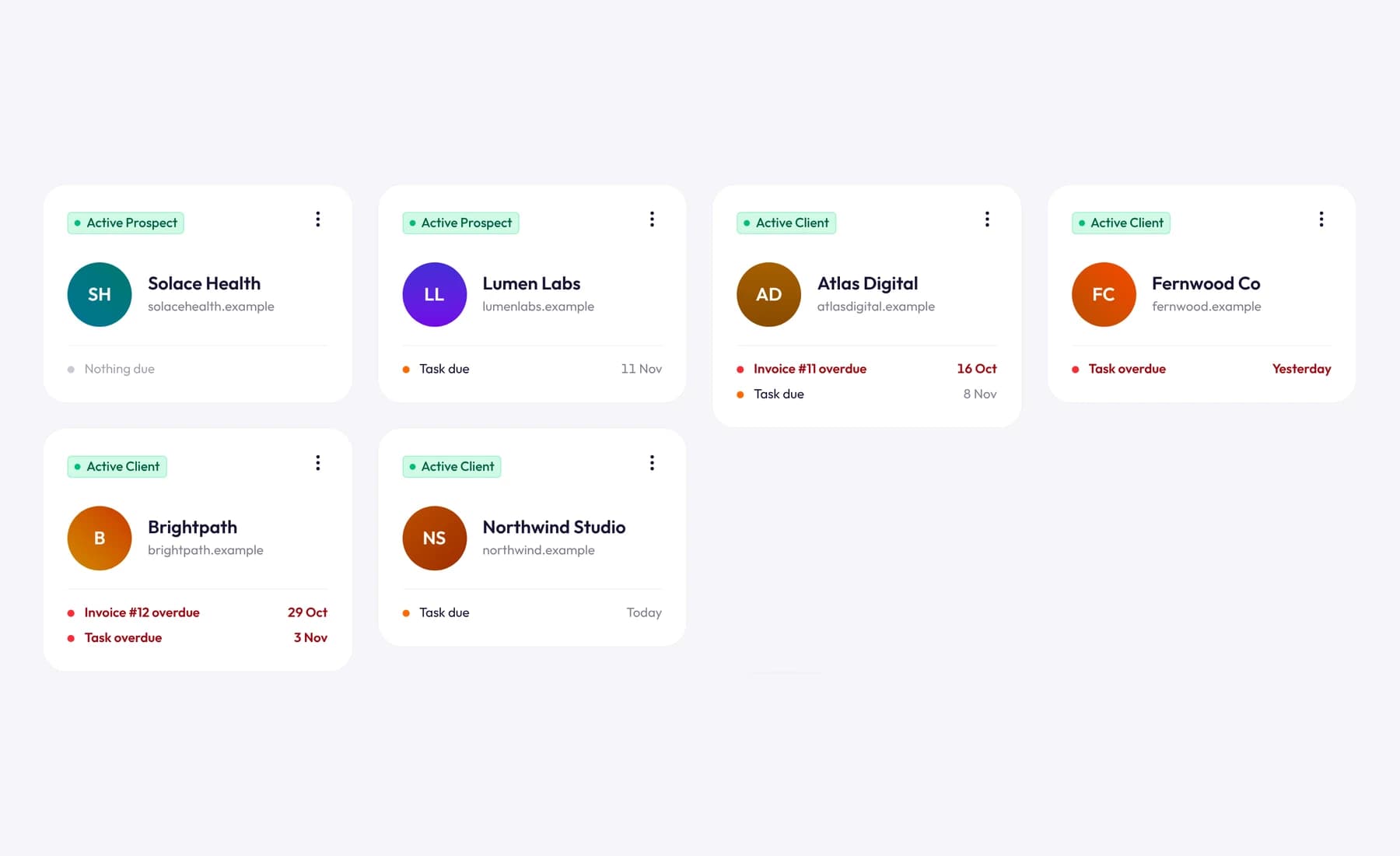
In Tristiks Grow, that's one client profile with their contacts, billing details, projects, tasks, notes, files, proposals and invoices, and the client list shows what's due or overdue for each one.
4. Send the welcome email
The welcome email tells the client what happens next, what you need from them and how you'll work together. Send it within a day of signing.
Subject: Welcome aboard: next steps for your new website

Hi Priya,

Thanks for signing, I'm looking forward to working with you.
Here's what happens over the next week:

1. Deposit: the first invoice is attached. Work starts as soon
   as it's paid.
2. Questionnaire: please fill in the short intake form
   (link below) by Wednesday. It takes about 15 minutes.
3. Access: I'll need access to your current website and your
   booking system. Please share them through a password manager
   or ask your developer to add me as a user; please don't send
   passwords by email.
4. Kickoff call: let's meet for 45 minutes on Thursday or Friday.
   Pick a time that suits you here: [scheduling link]

How we'll work together:
- I'll send an update every Friday.
- I reply to email within one working day, Monday to Friday.
- Your price includes two rounds of revisions on each deliverable.
  Anything new, I'll quote for before I start.

If you have any questions in the meantime, just reply here.

Thanks,
Suraj
5. Send the intake questionnaire
A short questionnaire gathers the facts before the kickoff call, so the call is spent on decisions, not on spelling out URLs. Keep it under 15 questions. For a website project:
- Who are your main customers, and what do they need from you?
- What should a visitor do on the site? (Book, call, buy, sign up?)
- Which three websites do you like, and why?
- Which websites do you dislike, and why?
- Who are your main competitors?
- Do you have brand guidelines, a logo and fonts?
- Who will write the copy, and when will it be ready?
- Who gives feedback, and who gives final approval?
- Are there any dates we must hit (a launch, an event, a campaign)?
- Is there anything you've tried before that didn't work?
Adapt the questions to your work. A bookkeeper might ask about accounting software and year-end; a developer about hosting, repositories and environments.
6. Collect access and assets
Make a list of everything you need, send it once and tick items off as they arrive. Missing access is a common reason a project can't start on day one.
- Accounts: website admin, hosting, domain, analytics, social media, booking or payment systems.
- Brand: logo files, fonts, colors and guidelines.
- Content: copy, photos, product details, past reports.
- People: who to contact for what, including their IT or developer.
Ask to be added as your own user wherever possible, rather than sharing a login. It's safer, and it makes removing your access at the end of the project simple.
7. Run the kickoff call
The kickoff call turns the proposal into a shared plan. Keep it to 45 minutes with a fixed agenda, and send the agenda in advance.
| Time | Topic |
|---|---|
| 5 min | Introductions: who's who, and who approves what |
| 10 min | Goals: what success looks like, in the client's words |
| 10 min | Scope: walk through what's included and what isn't |
| 10 min | Timeline: milestones, review dates and what you need from them |
| 5 min | Communication: channels, update day, response times |
| 5 min | Questions and next steps |
The scope walkthrough is the most important part. Saying "not included" out loud at the start is far easier than saying it in week five, and it's the simplest way to prevent scope creep.
Send a written recap the same day: decisions made, dates agreed and who's doing what. That email becomes the reference when questions come up later.
8. Agree the communication plan
Write down how you'll stay in touch and share it with everyone involved:
Communication plan: [Client] website project

Main channel:      Email (no project decisions in text messages)
Weekly update:     Every Friday by 5 p.m., by email
Check-in call:     Every other Tuesday, 30 minutes
Response time:     Within 1 working day, Monday to Friday
Urgent issues:     Phone [number], for site-down problems only
Feedback window:   3 working days per review
Approvals:         Priya (final sign-off); Sam (content)
Invoices go to:    accounts@example.com
Clients rarely complain about rules they agreed to at the start. They complain about rules that appear halfway through.
9. Plan the first deliverable
Break the first milestone into tasks with owners and due dates, on a board the client's work lives on. Aim to deliver something visible in the first week or two, even if it's small: a sitemap, a first draft or an audit.
Start tracking time against the project from day one, including the kickoff call and onboarding admin. Those hours show you what onboarding really costs, so you can price it into the next proposal.
10. Check in after the first deliverable
Once the first deliverable is out, ask the client two questions:
How has the first couple of weeks felt from your side? Is there anything you'd like us to do differently?
It takes two minutes, and it surfaces small problems while they're still small.
Copy-ready client onboarding checklist
Paste this into your task list for every new client.
New client onboarding: [Client name]

[ ] Contract and proposal signed
[ ] Deposit or first invoice sent
[ ] Deposit paid
[ ] Client profile set up: contacts, billing details, notes
[ ] Project, estimate and first tasks created
[ ] Shared folder created
[ ] Welcome email sent
[ ] Intake questionnaire sent
[ ] Intake questionnaire returned
[ ] Access to every account received
[ ] Brand files and content received
[ ] Kickoff call booked and agenda sent
[ ] Kickoff call held
[ ] Recap email sent
[ ] Communication plan shared
[ ] First deliverable planned with owners and dates
[ ] Time tracking set up for the project
[ ] First update sent on the agreed day
[ ] Check-in after first deliverable
Common client onboarding mistakes
- Starting before the deposit is paid. If the client can't pay the deposit on time, the later invoices will be worse.
- Asking for the same thing twice. Send one list of everything you need, not a drip of emails.
- A kickoff with no agenda. It turns into a 90-minute brainstorm with no decisions.
- No written recap. If it isn't written down, it wasn't agreed.
- Asking for passwords by email. Use a password manager or ask to be added as a user.
- Going quiet after kickoff. The first weekly update matters most; send it on the day you promised.
Frequently asked questions
What is client onboarding?
Client onboarding is the process of welcoming a new client and setting up the project after the contract is signed. It usually covers the deposit, a welcome email, an intake questionnaire, access to accounts and assets, a kickoff call and agreeing how you'll communicate.
How long should client onboarding take?
For most freelance and agency projects, one to two weeks from signed contract to first deliverable. The kickoff call usually happens within the first week, once the deposit is paid and the intake questionnaire is back.
What should be on a kickoff call agenda?
Introductions and roles, the client's goals, a walkthrough of the scope including what's excluded, the timeline and review dates, how you'll communicate, and next steps. Forty-five minutes is enough for most projects.
Should I charge for onboarding?
Onboarding is part of delivering the project, so build its time into your price rather than billing it separately. Track the hours it takes, so you know what to include in your next proposal.
Wrap up
Good onboarding is a checklist you run every time: signed contract, deposit, client setup, welcome email, questionnaire, access, kickoff and a communication plan. It takes a few hours, and it sets up everything that follows.
Onboarding is one stage of the client lifecycle; our complete guide to client management covers the rest. To keep each new client's contacts, contracts, tasks and invoices in one place from day one, see client management in Tristiks Grow.
Category: Client Management
Suraj Rao
Suraj Rao is the founder of Tristiks, the team behind Tristiks Grow and its desktop time tracker OneTrack. He writes about time tracking, client work and getting paid, and about DevOps, cloud and AI from years of building software.