Client Management: A Complete Guide for Agencies and Freelancers
 By Suraj Rao16 min read
What You'll Learn
- Client management runs through eight stages, from lead to offboarding, and most problems with clients start at a stage that was rushed or skipped.
- Keep one record per client with their contacts, billing details, agreed scope, notes, time and invoices, so nobody has to rely on memory or an inbox search.
- A set communication rhythm, a written change process and a monthly look at each client's effective hourly rate prevent most difficult client situations.

Client management is everything you do to win, run and keep client relationships: how you take on new clients, set expectations, communicate, deliver the work, report on it and get paid. Done well, clients always know what's happening, you always know what's owed, and nothing depends on your memory.
This guide walks through the whole client lifecycle, stage by stage, then covers what to keep on each client, how often to communicate, how to set expectations, how to handle difficult clients and which tools help. Each section links to a deeper guide, so treat this page as the map.
What good client management looks like
In a well-managed relationship, the client knows what you're working on, when the next deliverable lands and what they'll be billed. You know the same without opening five apps. That comes down to four things:
- One source of truth per client: contacts, scope, files, time and money in one place.
- A predictable rhythm: updates go out on the same day, invoices go out on the same schedule.
- Written agreements: scope, price, changes and payment terms are agreed before work starts.
- Numbers you check: hours against the estimate, unpaid invoices and what each client really earns you.
The client lifecycle, stage by stage
Every client relationship moves through the same eight stages, whether it's a two-week logo project or a three-year retainer. Here's the whole lifecycle at a glance:
| Stage | Your goal | What you produce | Deeper guide |
|---|---|---|---|
| 1. Lead | Decide if it's a fit | Discovery call notes | How to start freelancing |
| 2. Proposal | Win the work at the right price | A proposal with scope and pricing | How to write a project proposal |
| 3. Contract | Protect both sides | A signed contract | What to include in a freelance contract |
| 4. Onboarding | Start on the right foot | Welcome email, kickoff, access | Client onboarding checklist |
| 5. Delivery | Do the work on time and on budget | Tasks, tracked time, deliverables | Project budgets |
| 6. Reporting | Show progress and value | Weekly updates, time reports | Billable hours guide |
| 7. Billing | Get paid in full and on time | Invoices and reminders | How to write an invoice |
| 8. Offboarding | End well and leave the door open | Handover, final invoice, review | This guide |
1. Lead: qualify before you quote
A lead is anyone who might hire you. The job at this stage is to decide quickly whether the work fits, before you spend hours on a proposal.
On a 20 to 30 minute discovery call, find out:
- what they want to achieve, in their own words;
- why now, and what happens if they do nothing;
- the deadline, and whether it's real;
- the budget, or at least a range;
- who makes the decision and who else needs to approve it.
If the budget is far below what the work costs, say so on the call. If you're still working out what your time costs, our guide to calculating your hourly rate gives you a floor.
2. Proposal: put the scope in writing
A proposal turns the conversation into an offer: the client's goal, what you'll do, what you won't, the timeline and the price. It's also your first defense against scope creep, because a list of what's included is useless without a list of what isn't.
Keep it short, lead with the client's goal and end with one clear next step. Our guide to writing a project proposal has an example for every section, and our free proposal template gives you the structure.
How you price shapes the whole relationship. Retainers and fixed-price projects suit different kinds of work, and picking the wrong one is a common source of friction later.
3. Contract: agree on the rules
The contract covers what the proposal doesn't: payment terms, late fees, revisions, how changes are handled, who owns the work, confidentiality and how either side can end the agreement.
Never start work on a handshake, even for a friend. Our guide to what to include in a freelance contract walks through every clause, and our free contract template is a plain-English starting point.
Decide your payment terms here too. If you're unsure what "net 30" commits you to, read net 30 payment terms explained before you sign.
4. Onboarding: the first two weeks
Onboarding is the gap between "signed" and "first deliverable". It's where clients decide whether hiring you was a good idea, so run it from a checklist:
- Send a welcome email with what happens next.
- Send the deposit or first invoice.
- Send an intake questionnaire.
- Collect access and assets.
- Run a kickoff call.
- Agree how and when you'll communicate.
Our step-by-step client onboarding checklist has a sample welcome email, intake questions and a kickoff agenda you can copy.
5. Delivery: track the work against the plan
During delivery, the usual risk is drift: small requests that add up, late feedback, hours that quietly pass the estimate.
Three habits keep delivery on track:
- Break the scope into tasks with due dates, on a board the whole team can see. For client work, a simple Kanban board usually fits better than sprints; see Kanban vs Scrum for client projects.
- Track time against each project and compare it with the estimate every week. Our guide to project budgets shows how to spot an overrun early.
- Log every request that isn't in the scope, and quote for it before you do it. What is scope creep? has a script for saying "that's out of scope" politely.
If your team works across time zones, managing a remote team covers check-ins and fair time tracking.
6. Reporting: show what you did
Clients who can see progress rarely question invoices. Reporting doesn't need to be fancy: a short weekly email with what's done, what's next and anything you need from them covers most projects.
For hourly work, add the hours behind the invoice. A time report listing each entry's date, project and task answers most billing questions before they're asked. Our guide to billable hours covers what counts as billable and how to record it.
7. Billing: invoice on a schedule
Late invoices get paid late. Pick a billing rhythm per client (on delivery, at milestones, every two weeks or monthly) and stick to it.
- Write invoices clients can approve without questions. See how to write an invoice.
- For retainers and monthly fees, set the invoice to repeat. We explain how in introducing recurring invoices in Tristiks Grow.
- For clients abroad, agree the currency and who pays transfer fees up front. See how to invoice international clients.
- When a payment is late, follow a schedule rather than your mood. Our payment reminder email templates go from polite nudge to final notice.
8. Offboarding: end the project properly
Most freelancers skip this stage, and it's where repeat work and referrals come from. When a project ends:
- Hand over everything: final files, source files if the contract says so, logins you created, and a short note on how things work.
- Remove your access to their systems, and ask them to remove yours. Say in writing that you've done it.
- Send the final invoice and confirm nothing else is outstanding.
- Ask for feedback: two or three questions about what worked and what didn't.
- Ask for a referral or a testimonial, if the project went well.
- Set a reminder to check in three months later. Many repeat projects start with "we were just thinking about you".
Archive the client rather than deleting them. Their history is your best guide to pricing the next job with them.
What to keep on each client
Every client needs one record that holds everything about them. If you have to search your inbox for a client's billing address, the record is missing something.
| What | Why you need it |
|---|---|
| Company name, address, website | Invoices, contracts and tax details |
| Contacts, with roles | Who approves work, who pays invoices, who sends feedback |
| Billing details | Hourly rate, currency, tax rate and payment terms |
| Signed proposal and contract | The agreed scope and terms, for when questions come up |
| Projects and tasks | What's in progress and what's due |
| Tracked time per project | Hours against the estimate, and what to bill |
| Invoices and payments | What's paid, what's due and what's overdue |
| Notes | Decisions, preferences and anything said on a call |
| Files and links | Brand assets, briefs, shared folders, logins (stored safely) |
Two items are easy to forget:
- Who approves what. The person who briefs you is often not the person who signs off or pays. Write down both.
- Decisions made on calls. A one-line note ("Agreed to drop the blog page, launch moves to 14 March") saves an argument three months later.
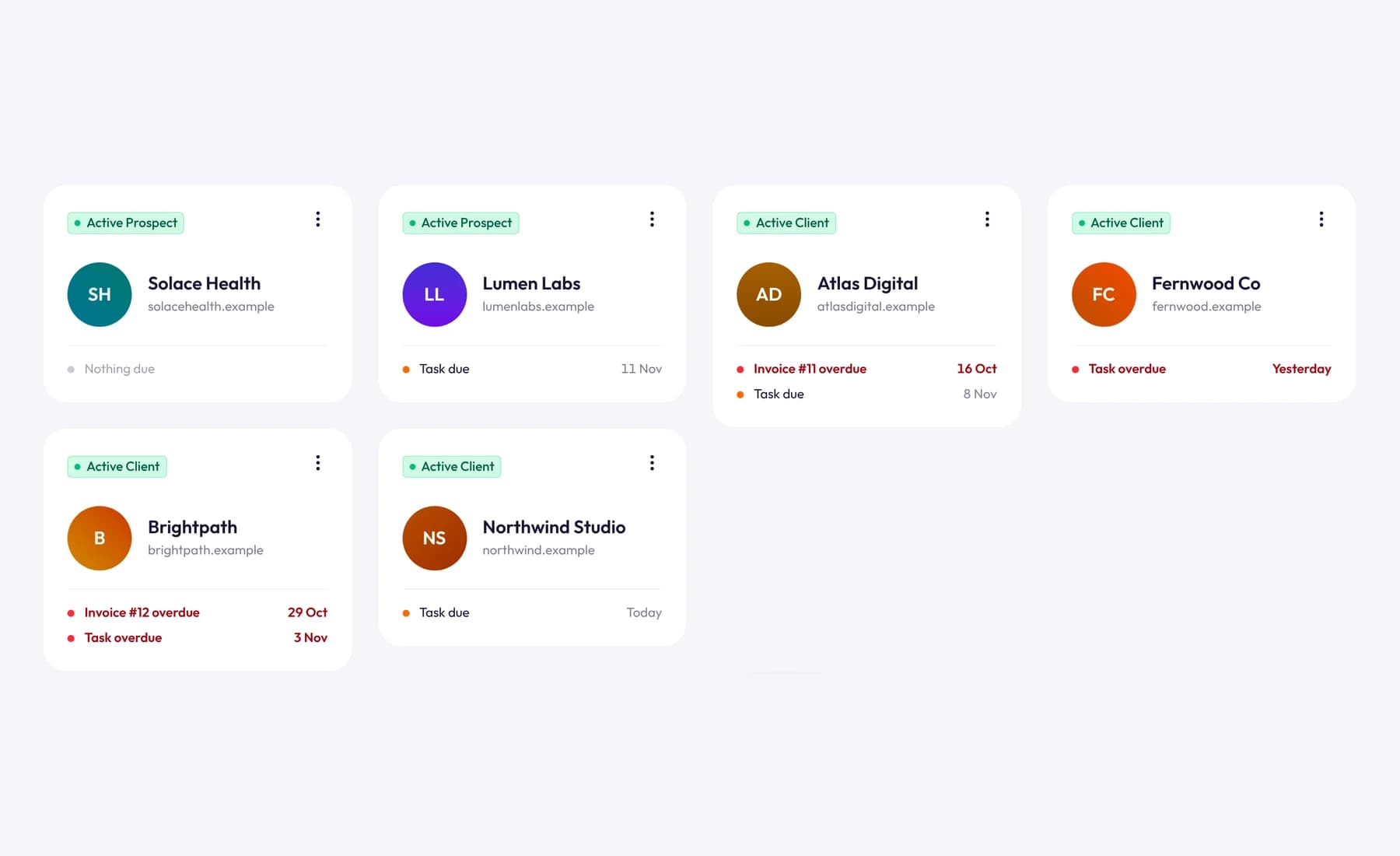
In Tristiks Grow, each client has one profile with their contacts, billing details, projects, tasks, notes, files, proposals, contracts and invoices, and the client list shows each one's status and anything due or overdue.
How often to communicate with clients
Most client frustration is about silence, not the work. A fixed rhythm fixes that: the client knows when they'll hear from you and stops chasing.
Match the rhythm to the engagement:
| Engagement | Written update | Call | Billing |
|---|---|---|---|
| Small project (under 4 weeks) | Twice a week, or at each milestone | Kickoff and handover | Deposit, then on delivery |
| Larger project (1 to 6 months) | Weekly, same day | Every 2 weeks | At milestones or monthly |
| Monthly retainer | Weekly | Monthly review | Monthly, in advance |
| Ongoing hourly support | Weekly summary of hours | Quarterly review | Every 2 weeks or monthly |
A weekly update template
Send this on the same day every week, even when there's not much to report. "No blockers, on track" is still useful news.
Subject: [Project name] update, week of 9 November

Hi Sam,

Done this week:
- Homepage design approved
- Services page draft sent for review

Next week:
- Build homepage and services page
- Start contact page design

Need from you:
- Feedback on the services page draft by Wednesday

Budget: 42 of 80 estimated hours used. On track.

Thanks,
Suraj
The budget line matters: when a client sees hours creep up weekly, an overrun is never a surprise.
Response times
Agree response times in writing at the start, such as replies within one working day and urgent issues by phone. Then keep to them: one reply at 11 p.m. teaches the client to expect it.
Setting expectations from day one
Most "difficult clients" are clients whose expectations were never set. Put the following in writing before work starts, usually in the proposal, contract or welcome email:
- Scope: what's included and what isn't.
- Revisions: how many rounds, and what counts as a round.
- Feedback: how long the client has to review, and what happens to the timeline if feedback is late.
- Changes: new requests get a written quote before work starts.
- Communication: which channel, which hours and how fast you reply.
- Payment: amounts, dates, terms and what happens when an invoice is late.
A short "how we work" section in your welcome email covers most of it:
Here's how we'll work together. I'll send an update every Friday. I reply to email within one working day, Monday to Friday. Your price includes two rounds of revisions on each deliverable; anything beyond that, or anything new, I'll quote for before I start. If feedback takes longer than three working days, the launch date moves by the same amount.
Clients rarely push back on rules they agreed to at the start.
How to handle difficult clients
Even with clear expectations, some situations get tense. The fix is nearly always to go back to what was agreed, calmly and early.
| Situation | What's usually behind it | What to do |
|---|---|---|
| Keeps adding "small" requests | No change process | Log each request and quote for it before starting |
| Pays late, every time | Payment isn't a priority for them | Shorter terms, deposits, automatic reminders |
| Slow to give feedback | Busy, or unsure who decides | Set review deadlines and move dates when they slip |
| Unhappy with the work | The brief and the result don't match | Revisit the brief together before redoing anything |
| Constant "urgent" requests | No agreed response times | Agree what urgent means, and charge for rush work |
| Goes silent mid-project | Priorities changed on their side | Pause the work in writing and agree what restarts it |
Scripts for the hard conversations
When a request is out of scope:
Happy to add that. It isn't part of the current scope, so I'll send a quick quote for it today. Once you approve it, I'll fit it into the schedule.
When an invoice is overdue:
Hi Sam, invoice 1042 for $2,400 was due on 3 November and I can't see a payment yet. Could you check where it's at? If anything's holding it up, let me know and we'll sort it out.
When the client goes silent:
I haven't heard back on the homepage review, so I'll pause work on the project from Friday. When you're ready to pick it up again, reply here and I'll confirm a new launch date.
When to let a client go
Sometimes the best client management decision is to end the relationship. Consider it when a client regularly pays late, disputes every invoice, treats your team badly or earns you far less per hour than everyone else.
End it by the contract's termination clause, finish or hand over what's in progress, send the final invoice and keep it polite. The industry is smaller than it looks.
Client management numbers worth checking
You don't need a dashboard of 20 metrics. Four numbers, checked monthly, tell you which clients are healthy:
- Effective hourly rate: what the client paid you, divided by all the hours you spent on them, including calls and email.
- Hours against estimate: how much of each project's estimate is used, compared with how much of the work is done.
- Days to pay: how long their invoices take to be paid, on average.
- Share of revenue: how much of your income comes from this one client.
A worked example: effective hourly rate
Say you have two clients on a fixed monthly fee of $3,000 each.
| Client A | Client B | |
|---|---|---|
| Monthly fee | $3,000 | $3,000 |
| Hours on the work | 28 | 30 |
| Hours on calls, email and revisions | 4 | 20 |
| Total hours | 32 | 50 |
| Effective hourly rate | $93.75 | $60.00 |
On paper they pay the same. In practice, Client B pays you over a third less per hour. That's the conversation to have at the next review: tighter scope, fewer meetings or a higher fee.
You can only work this out if you track the time you spend on each client, including the non-billable parts. Our hourly rate calculator helps you see what rate you need in the first place.
If one client brings in more than about half your revenue, keep a pipeline going: losing them would hurt.
Client management tools
You need a tool for each job in the lifecycle. They can be separate apps or one workspace; what matters is that the information connects.
| Job | What it needs to do | Common options |
|---|---|---|
| Client records | Contacts, billing details, notes and files per client | A CRM, a spreadsheet, or a client workspace |
| Proposals and contracts | Templates, sending, e-signatures, status | A document tool plus an e-signature tool, or one app that does both |
| Tasks | Due dates, a board, comments and files | A task board or project management tool |
| Time tracking | Time per client and project, billable or not | A timer app, or a desktop tracker |
| Invoicing | Invoices from tracked time, reminders | Accounting or invoicing software |
| Communication | One channel per client | Email, or a shared chat channel |
| Files | One folder per client | Cloud storage |
Separate tools hurt at the hand-offs: copying hours into an invoice, or retyping a proposal's price. Each copy is a chance to lose billable time. Our guide to the freelancer software stack covers each category in more detail.
How Tristiks Grow handles client management
We built Tristiks Grow so each stage feeds the next. Here's how the lifecycle maps onto it:
- Clients: one profile per client with contacts, billing details (hourly rate, currency, tax rate and payment terms), projects, tasks, notes and files. See client management software.
- Proposals and contracts: branded templates, a secure link to sign online, a status that moves from sent to viewed to signed, and an option to create a draft invoice the moment a proposal is signed. See proposal and contract software.
- Delivery: a task board with time tracked on every card, and time tracked against each project's estimate.
- Reporting: a PDF time and activity report you can attach to the invoice email.
- Billing: invoices from tracked hours and expenses, recurring invoices and automatic payment reminders.
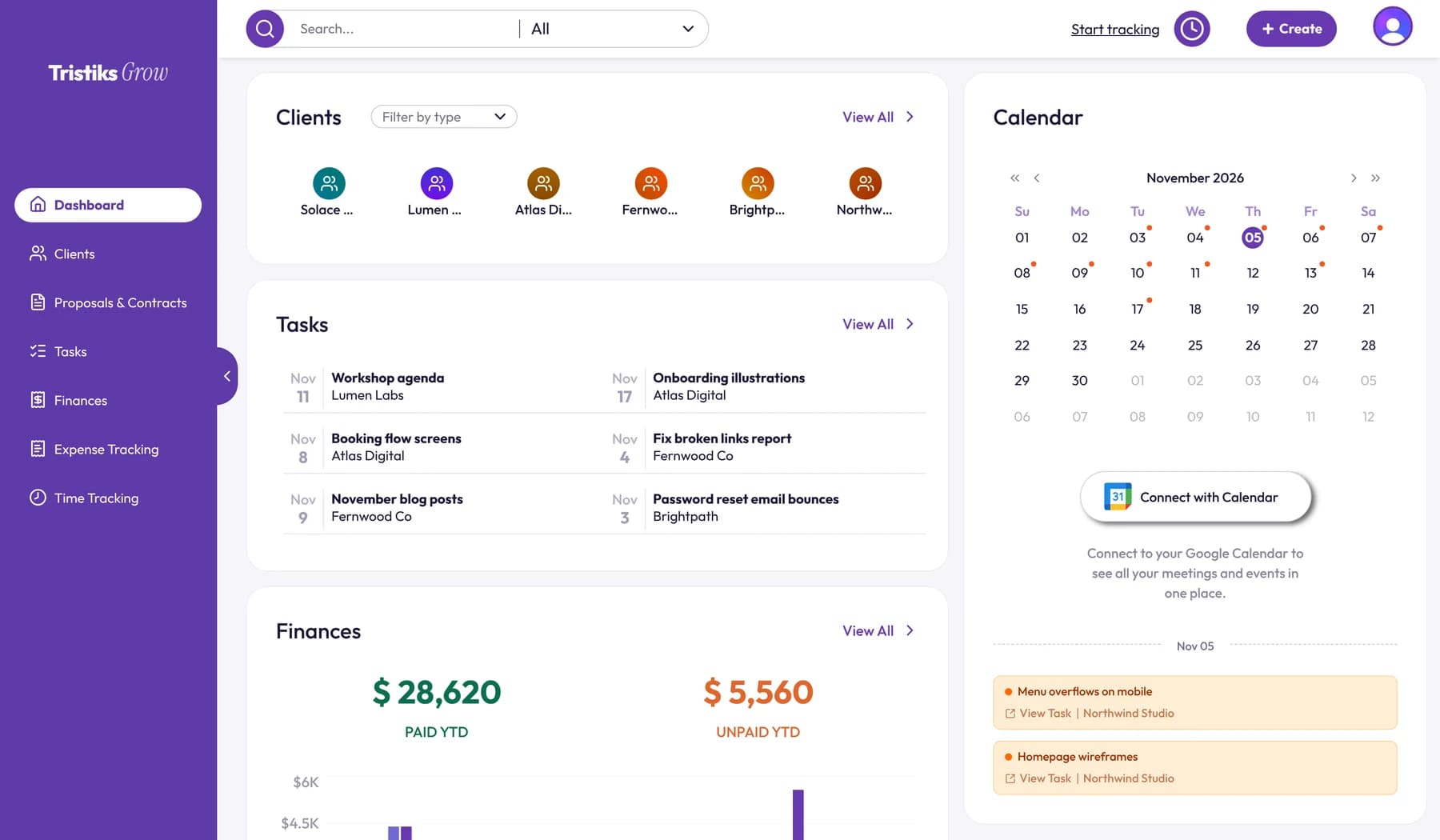
The dashboard pulls it together: your clients, tasks due this week, what's paid and unpaid this year, and a calendar of due dates.
Your client management reading list
Every guide on the blog about working with clients, in lifecycle order:
Winning the work
- How to start freelancing: a checklist for your first month
- How to calculate your hourly rate
- Retainers vs. fixed-price projects
- How to write a project proposal
- Freelance contract: what to include
Starting and running the work
- Onboarding a new client: a step-by-step checklist
- What is scope creep, and how to prevent it
- Project budgets: how to know you're on track
- Kanban vs Scrum for client projects
- How to manage a remote team
- The complete guide to billable hours
Getting paid
- How to write an invoice
- Net 30 payment terms explained
- Payment reminder email templates
- How to invoice international clients
- Introducing recurring invoices in Tristiks Grow
Tools
Frequently asked questions
What is client management?
Client management is the process of winning, running and keeping client relationships: qualifying leads, sending proposals and contracts, onboarding, delivering and reporting on the work, billing and offboarding. For freelancers and agencies, it also means keeping one organized record per client.
What are the stages of the client lifecycle?
The usual stages are lead, proposal, contract, onboarding, delivery, reporting, billing and offboarding. Long-term clients loop through delivery, reporting and billing many times before a project or retainer ends.
What is the best way to manage multiple clients?
Give each client one record with their scope, contacts, tasks, time and invoices, and run every client on the same weekly rhythm: updates on a fixed day, time tracked per project and invoices on a schedule. Review each client's hours against the estimate weekly, so no project quietly overruns.
Do freelancers need client management software?
With one or two clients, a spreadsheet and a folder per client can work. Once you have several clients, or a team, software that links client records to proposals, time and invoices saves hours of copying and stops billable time going missing.
How do you deal with a difficult client?
Go back to what you agreed in writing: the scope, the change process, the payment terms. Raise problems early and calmly, quote for anything out of scope before doing it, and if the relationship still doesn't work, end it by the contract's termination clause.
Wrap up
Client management isn't a big system. It's eight stages, one record per client and a rhythm you keep, so clients stay informed and you get paid for every hour.
Start with the stage that causes you the most trouble today, and fix that first. When you're ready to keep every client in one place, take a look at client management in Tristiks Grow.
Category: Client Management
Suraj Rao
Suraj Rao is the founder of Tristiks, the team behind Tristiks Grow and its desktop time tracker OneTrack. He writes about time tracking, client work and getting paid, and about DevOps, cloud and AI from years of building software.