Best Time Doctor Alternatives in 2026 (Compared)
 By Suraj Rao11 min read
What You'll Learn
- Time Doctor is built for managing a distributed workforce: screenshots, app and website usage, attendance and payroll. People usually leave because they bill clients, or because the monitoring is more than the work needs.
- Hubstaff and DeskTime are the closest like-for-like swaps, Toggl Track and Timely drop screenshots on purpose, Clockify has the biggest free plan, and Harvest pairs time with invoices.
- If you bill clients, pick a tool where tracked hours become invoices in the same place, and decide what you track (and say so in writing) before you switch.

The best Time Doctor alternatives in 2026 are Hubstaff if you want similar monitoring plus invoicing and payroll, DeskTime for automatic tracking at a lower price, Toggl Track or Timely if you want no screenshots at all, Clockify for a free plan, Harvest for simple time and invoices, and Tristiks Grow if you also send proposals and bill clients from the hours you track.
This guide is for agencies and teams doing client work who want a tool that also bills clients, or feels less like surveillance.
One disclosure: we make Tristiks Grow, so it's on the list. Time Doctor, DeskTime and Timely facts come from their own pages as we checked them in November 2026; Hubstaff, Toggl, Clockify and Harvest from their pricing pages in September 2026. Prices change, so check each link.
What Time Doctor does well
Time Doctor is a mature workforce analytics tool. According to its pricing page (checked November 2026):
- Screenshots from the cheapest plan. Basic includes automatic tracking, screenshots, projects and tasks, a timeline report and online or offline tracking.
- Workforce features on Standard. Schedules, attendance, time approvals, an activity summary, web and app usage reporting, productivity ratings, leave and break tracking, and payroll.
- Deeper monitoring on Premium, including unusual-activity reports, mouse jiggler detection and video screen recording (a $3 per user add-on on lower plans).
- A client login, though Time Doctor's own pages disagree on which plan includes it.
- Idle handling. Its help center says a pop-up appears when someone is inactive past a limit the admin sets, and a break starts if they don't respond.
- A 14-day free trial with Premium features and no credit card.
If you run payroll, attendance and schedules for a remote team, Time Doctor may still be the right tool.
Why people look for Time Doctor alternatives
Time Doctor is well rated, but a few themes come up repeatedly in reviews.
- Monitoring that feels invasive. Connecteam's review says strict monitoring such as screenshots might feel invasive to some employees and hurt morale, and negative reviews on sites such as Capterra and G2 often mention feeling micromanaged. Time Doctor offers screenshot blurring, and admins can let people delete their own screenshots.
- No invoicing listed. Time Doctor's pricing page doesn't list client invoicing, so agencies end up exporting hours to another tool to bill them.
- Per-user pricing. Plans run from $6.67 to $16.70 per user per month billed annually, or $8 to $20 monthly (checked November 2026), with no free plan.
- Built for managers, not clients. Proposals, contracts and expenses aren't listed.
None of this makes Time Doctor a bad tool. It's built for a different job than billing clients.
What to look for in an alternative
- How much monitoring do you want? Screenshots can be useful proof of work for clients, or they can damage trust. If you keep them, look for tools where they're optional, people can delete their own captures, and nothing is recorded while the timer is off. Our guide to time tracking vs employee monitoring covers where the line sits.
- Idle detection that asks the person whether to keep time away, rather than deciding silently.
- Invoices from tracked time at the client's rate, without copying between tools.
- Proposals and expenses, if you also get work signed and bill costs back.
- Price at your real team size. Per-user and flat pricing behave very differently as you hire.
- The law. Monitoring rules vary by country and state; see whether screenshot monitoring is legal. That's general information, not legal advice.
Time Doctor alternatives compared
"Not listed" means we couldn't find it on the tool's own pricing page or help docs, not that it definitely doesn't exist. "No" means the tool says so itself.
| Tool | Screenshots and activity | Idle detection | Invoicing | Proposals and contracts | Expenses | Free plan or trial | Starting price |
|---|---|---|---|---|---|---|---|
| Time Doctor | Yes, from Basic; video recording on Premium | Pop-up after an admin-set limit | Not listed | Not listed | Not listed | 14-day trial | $6.67 per user a month (annual) |
| Tristiks Grow | Optional, in the desktop app | Asks to keep or discard | Yes, from tracked hours | Yes, signed online | Yes, with AI receipt scanning | 14-day trial | $12 a month for 1 seat |
| Hubstaff | Yes, limited on Starter and Grow | Idle timeout from Grow | Yes | Not listed | From Grow | 14-day trial | $4.99 per seat a month (annual), 2-seat minimum |
| DeskTime | Screenshots on Premium | Listed on Pro | Project costs; see below | Not listed | Not listed | Free for 1 user, 14-day trial | $6.42 per user a month (annual) |
| Toggl Track | No, by design | Yes | PDF invoices from reports | Not listed | Not listed | Free for up to 3 users | $9 per user a month (annual) |
| Clockify | Activity monitoring on Pro | Yes, on Free | From Standard | Not listed | From Pro | Free for up to 5 users | $3.99 per seat a month (annual) |
| Harvest | Not listed | Not listed | Yes | Not listed | Yes | Free for 1 seat, 2 projects | $9 per seat a month (annual) |
| Timely | No, by design | Not listed | Not listed | Not listed | Not listed | Free trial | $11 per user a month (monthly) |
For a full feature-by-feature view of the closest pair, see Tristiks Grow vs Hubstaff. Our compare page covers Toggl, Clockify and Harvest the same way.
The 7 best Time Doctor alternatives
1. Tristiks Grow: best if you bill clients for tracked time
Best for: agencies and small teams who want proof of work and invoices built from the same hours. If you don't bill clients, start with Hubstaff or DeskTime instead.
Strengths:
- OneTrack desktop app for macOS, Windows and Linux, with optional screenshots and an activity percentage for every ten minutes of tracked time, from keyboard and mouse use.
- Clear limits. It never records keys pressed, website history, or anything while the timer is stopped. People can delete their own screenshots (that time comes off the timesheet), and only they and the account owner see captures.
- Idle detection that asks whether to keep or discard time away.
- Invoices from tracked hours and expenses at each client's rate, with recurring invoices, payment reminders and an optional PDF time and activity report.
- Proposals and contracts signed online, with an optional draft invoice when the client signs.
- Expenses with AI receipt scanning, billable to the client's next invoice.
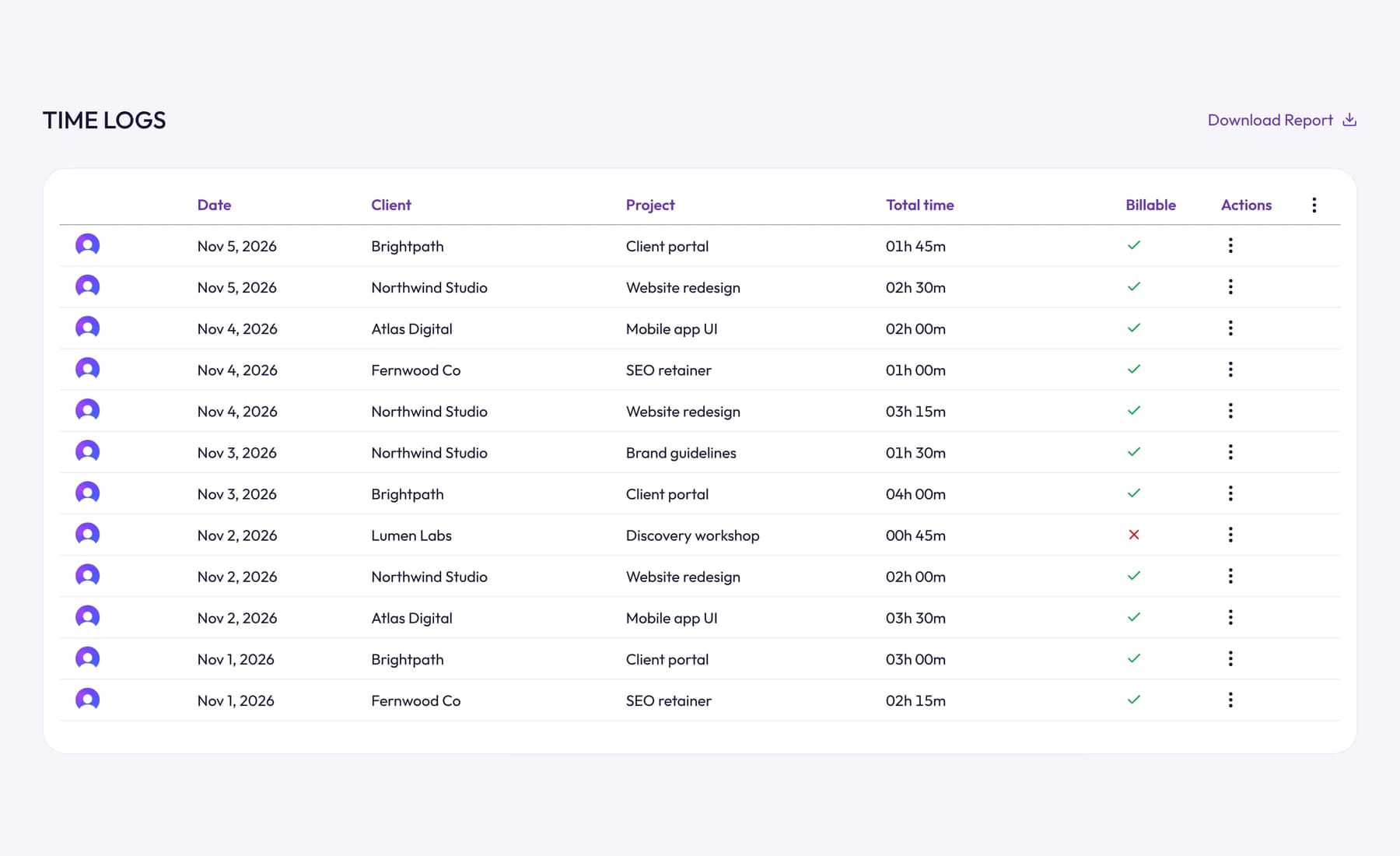
Pricing: flat per plan: $12 a month (1 seat), $19 (up to 3 seats) or $39 (up to 10 seats), 12% off yearly. Free 14-day trial, no card. See pricing.
Limits: no free plan, and the largest plan covers 10 seats. It's built for client work, not workforce management: for payroll, attendance or schedules, Time Doctor or Hubstaff fits better.
2. Hubstaff: best like-for-like swap with invoicing and payroll
Best for: remote and field teams that want Time Doctor-style monitoring plus client invoices.
Strengths:
- Time tracking, activity levels, screenshots and clients and invoices from Starter, with screenshots limited on Starter and Grow.
- Tasks, idle timeout, project budgets and expenses from Grow.
- Unlimited screenshots, auto-discard of idle time, and payments and payroll on Team.
- Add-ons including mobile location tracking with geofenced job sites.
Pricing: Starter $4.99, Grow $7.50 and Team $10 per seat per month billed annually, with a 2-seat minimum (checked September 2026). Free 14-day trial. See Hubstaff pricing.
Limits: proposals aren't listed, and it won't feel lighter than Time Doctor. See our Hubstaff alternatives guide too.
3. DeskTime: best for automatic tracking at a lower price
Best for: office and hybrid teams that want automatic tracking for less.
Strengths:
- Automatic time tracking with app and URL tracking and productivity calculations.
- Screenshots on Premium, according to DeskTime's help center, which also lists idle time tracking on Pro.
- Project cost calculation. A DeskTime comparison page says it can issue a client invoice from hourly rates; we couldn't confirm which plan.
- A free Lite plan for individual use, according to DeskTime's FAQ.
Pricing: Pro $6.42 and Premium $9.17 per user per month billed annually, or $7 and $10 monthly (checked November 2026). See DeskTime pricing.
Limits: it won't fix a trust problem. Proposals and expenses aren't listed.
4. Toggl Track: best if you want no monitoring at all
Best for: teams leaving screenshots behind on purpose.
Strengths:
- No screenshots, keystrokes, browsing history or location. Toggl says this plainly in its pricing FAQ.
- Timers, calendar integrations, tasks and boards on the free plan; billable rates on Starter; profitability reports and approvals on Premium.
- Idle time detection and apps for web, Windows, macOS, Android and iOS.
- Basic invoices. Toggl's support docs describe creating a PDF invoice from a report.
Pricing: free for up to 3 users, then Starter $9 and Premium $16 per user per month billed annually (checked September 2026). See Toggl pricing.
Limits: no proof of work, by design, and invoicing is basic. Proposals and expenses aren't listed. See Tristiks Grow vs Toggl.
5. Clockify: best free plan for a team
Best for: teams that want free tracking now, monitoring and invoicing later.
Strengths:
- A free plan for up to 5 users with the timer, timesheets, mobile and desktop apps, idle detection, reminders and reports.
- Invoicing, recurring invoices, approvals and time locking on Standard.
- Activity monitoring, expenses, multiple currencies, budgets and GPS tracking on Pro.
Pricing: Basic $3.99, Standard $5.49, Pro $7.99 and Enterprise $11.99 per seat per month billed annually (checked September 2026). See Clockify pricing.
Limits: a like-for-like swap for Time Doctor means a paid tier. Proposals aren't listed. See Tristiks Grow vs Clockify.
6. Harvest: best for simple time and invoices
Best for: small agencies that care more about invoices than monitoring.
Strengths:
- Time tracking, invoicing and expenses on every plan, including the free one.
- Project estimates and web, desktop and mobile apps.
- Accounting and payment integrations on Teams, and timesheet approval on Enterprise.
Pricing: free for 1 seat and 2 projects, then Teams from $9 and Enterprise from $14 per seat per month billed annually, with some extras billed by usage (checked September 2026). See Harvest pricing.
Limits: screenshots and proposals aren't listed, which suits teams dropping monitoring. See Tristiks Grow vs Harvest.
7. Timely: best for automatic, private timesheets
Best for: knowledge workers who want timesheets without anyone watching their screen.
Strengths:
- Privacy by design. Timely's privacy page says it will never support employee screenshots, keystroke monitoring or other invasive surveillance, and its Memory app records activity to a private timeline only the user can see.
- Automatic tracking. Reviewers such as The Digital Project Manager describe Memory capturing time in apps, meetings and documents and drafting timesheet entries for the user to review.
Pricing: Starter $11, Premium $20 and Unlimited $28 per user per month billed monthly, according to Timely's own blog, with lower annual rates (checked November 2026). Third-party listings say Starter is capped at 5 users. See Timely pricing.
Limits: reviewers describe it as pricier than most trackers, and some say Memory can assign time to the wrong project. We couldn't confirm invoicing, proposals or expenses on its site.
Time Doctor vs Hubstaff
Many people are really choosing between these two:
- Both take screenshots, track activity and support payroll.
- Hubstaff lists clients and invoices from its cheapest plan and payroll on Team ($10 per seat annually).
- Time Doctor puts payroll on Standard ($11.67 per user annually) and adds video screen recording and unusual-activity reports, which makes it the more intensive of the two.
If you bill clients, Hubstaff is the closer fit. For workforce analytics, Time Doctor goes further.
How to choose a Time Doctor alternative
- "We need invoices from our hours." Tristiks Grow, Hubstaff, Harvest or Clockify (Standard). Of these, only Tristiks Grow lists proposals and contracts too.
- "The monitoring is too much." Toggl Track or Timely, which drop screenshots by design, or Harvest. If clients still want proof of work, keep screenshots optional; see time tracking with screenshots.
- "We need the same monitoring, cheaper." DeskTime or Hubstaff.
- "We need a free plan." Clockify (up to 5 users), Toggl (up to 3) or Harvest (1 seat).
- "Per-user pricing keeps climbing." Compare flat plans against per-seat ones at the team size you'll have in a year; our guide to per-seat vs flat pricing shows how.
To switch: export your Time Doctor reports, cut over at the start of a billing period, tell the team in writing what's tracked, and run both tools for a few days. Our checklist for switching time tracking software covers the data, and our guide to time tracking adoption covers the people side.
How Tristiks Grow helps agencies leaving Time Doctor
Track time with the web timer or OneTrack, with screenshots only if you turn them on. Hours are saved at the client's rate and go onto an invoice, with a PDF activity report as proof of work if you want one. Proposals get signed online, and one flat price covers up to 3 or 10 seats.
Frequently asked questions
What is the best free alternative to Time Doctor?
Clockify's free plan covers up to 5 users and Toggl Track's up to 3, without screenshots. Harvest's free plan includes invoicing for 1 seat and 2 projects.
Which Time Doctor alternative is less invasive?
Toggl Track and Timely both say they don't take screenshots. If you need some proof of work, choose a tool where screenshots are optional, people can delete their own, and nothing is recorded while the timer is off.
Is there a Time Doctor alternative with invoicing?
Yes. Tristiks Grow, Hubstaff and Harvest list invoicing from their first plan, Clockify from Standard, and Toggl Track turns reports into PDF invoices.
Wrap up
Time Doctor is strong at workforce analytics. Of the alternatives, Hubstaff and DeskTime keep the monitoring, Toggl Track and Timely drop it, Clockify starts free, and Harvest keeps time and invoices simple. Read our list of the best time tracking apps for more options.
If you track time to bill clients, see how time tracking with screenshots works in Tristiks Grow, and try it free for 14 days.
Category: Time Tracking
Suraj Rao
Suraj Rao is the founder of Tristiks, the team behind Tristiks Grow and its desktop time tracker OneTrack. He writes about time tracking, client work and getting paid, and about DevOps, cloud and AI from years of building software.