Time Tracking vs Employee Monitoring: Where to Draw the Line
 By Suraj Rao11 min read
What You'll Learn
- Time tracking records how long work took and what it was for; employee monitoring records the person. The further a tool moves from the work toward the worker, the more trust it costs.
- In 2026 California banned AI tools that infer workers' emotions, the EU already bans emotion recognition at work and treats AI performance monitoring as high-risk, and New York requires written notice of monitoring.
- Fair tracking has a written purpose, no secret mode, records only while the timer runs, lets people see and delete their own data, and keeps a human in every decision.
Time tracking records the work: how long a task took, which client and project it was for, and whether it's billable. Employee monitoring records the person: what's on their screen, which sites they visit, what they type, and sometimes their face or mood. Most tools sit somewhere between the two, and the line you choose decides whether your team sees the tracker as a billing tool or as bossware.
This is general information, not legal advice. Laws on workplace monitoring change often and depend on where each person works. The legal detail lives in our guide on whether employee screenshot monitoring is legal. Sources below were checked in November 2026.
This post covers definitions, a spectrum from least to most invasive, why the line matters more in 2026, principles for fair tracking, a policy template and questions to ask vendors.
Time tracking and employee monitoring, defined
Time tracking answers "how long did this work take, and who was it for?" A person starts a timer or types in an entry against a client, project and task. The output is a timesheet agencies use to bill clients, check estimates and see who's overloaded.
Employee monitoring answers "what is this person doing?" It collects data about the worker's behaviour, often continuously and often without them choosing when. The output is a record of the person: screens, apps, sites, keystrokes, location, video.
"Bossware" is the informal name for the far end of monitoring: software that watches workers in detail, often in ways they can't see or control, and increasingly scores them with AI.
Plenty of time trackers include monitoring features, and plenty of monitoring tools include a timer. What matters is what's collected, when, who controls it and what it's used for.
The tracking spectrum, from least to most invasive
Each step down this table tells you a little more about activity and a lot more about the person. Most agencies need only the first row or two.
| Method | What it records | What it tells you | Trust cost |
|---|---|---|---|
| Manual timer or entries | Hours against client, project and task, entered by the person | How long work took and who to bill | Very low: the person decides what's recorded |
| Automatic time capture | Which apps or documents were open, used to suggest entries | A draft of the day the person can turn into a timesheet | Low if it stays private to the person until they submit it; higher if managers see the raw log |
| Activity levels | Whether the keyboard or mouse was in use during tracked time, as a percentage | Whether someone was at the computer while the timer ran | Moderate: easy to misread as productivity |
| Screenshots | Periodic images of the screen during tracked time | What was on screen at that moment | High: can capture private messages, client data and passwords |
| App and URL logging | Every application and website used, often with time spent | Where attention went | High: reveals personal browsing, health searches and more |
| Keystroke logging | Keys pressed, sometimes the text itself | Typing volume or content | Very high: captures passwords and private writing |
| Webcam, biometric and emotion AI | Video, photos, face data, inferred mood or attention | Presence, identity, guessed emotional state | Severe, and now restricted or banned in some places |
A few notes on reading it:
- Activity levels measure input, not output. A developer reading documentation, a designer sketching on paper and anyone on a call will show low activity while doing real work. Use them to spot a timer left running, not to rank people.
- Screenshots are evidence, not insight. They help when a client contract asks for proof of billed hours, and tell you almost nothing about quality.
- The last three rows answer no billing or project question. If you track for invoices and estimates, stop above them.
Our guide to employee productivity tracking covers which output metrics are worth measuring instead.
Why the line matters more in 2026
Lawmakers have started drawing the line themselves, and the evidence on heavy monitoring keeps pointing the same way.
California restricts AI monitoring
On September 30, 2026, Governor Newsom signed a package of workplace AI and surveillance bills, according to Ogletree's summary and other law firm alerts:
- AB 1883 bars employers from using AI-enabled tools to infer employees' emotional states and from collecting their neural data, with exceptions such as safety, as Hunton describes it. Law firm summaries report penalties of up to $500 per violation.
- AB 1331, in its final form, bans the use of workplace surveillance tools in workplace bathrooms, with limited exceptions.
- SB 947, the "No Robo Bosses Act", requires written notice when an automated decision system primarily drives a discipline or termination decision, and lets employees ask what data the system used, according to Sheppard Mullin.
Most summaries give January 1, 2027 as the start date for AB 1883 and AB 1331, and July 1, 2027 for SB 947, though at least one firm read the timing differently, so check the bill text. A broader bill, AB 1221, which would have required advance notice and limits on most workplace surveillance tools, did not pass.
The EU bans emotion AI at work and treats monitoring AI as high-risk
Under the EU AI Act, AI systems that infer emotions in the workplace have been prohibited since February 2025, except for medical or safety reasons. The Future of Privacy Forum has a clear explainer.
Separately, Annex III of the Act lists AI used in employment as high-risk, including AI used to monitor and evaluate the performance and behaviour of workers. High-risk systems come with obligations on risk management, human oversight and transparency. Those obligations were due in August 2026, but the EU agreed to move the Annex III date to December 2, 2027, according to Gibson Dunn. The GDPR rules on monitoring, covered in our legal guide, apply already.
New York requires notice, and more is proposed
New York already requires private employers to give written notice of electronic monitoring and get it acknowledged; our legal guide covers the details. A proposed Bossware and Oppressive Technology Act would go much further, but as of November 2026 the latest version had been referred to the Senate Labor Committee and hadn't passed.
What monitoring does to people
The American Psychological Association's 2023 Work in America survey found that 56% of workers who were monitored felt tense or stressed at work, compared with 40% of those who weren't. A 2023 meta-analysis in Personnel Psychology of electronic performance monitoring research found no clear performance gain from monitoring on average and linked it to higher stress. These are associations, not proof of cause, but they don't suggest closer watching makes people work better.
The lesson: the closer a tool gets to the person, the more legal checks it needs and the more goodwill it spends.
Seven principles for fair tracking
These work as a test for any setup, whatever tool you use.
- A written purpose. Name the question the data answers: "bill clients accurately", "compare estimates with actual hours", "show a client proof of hours on a monitored contract". If you can't name it, don't collect it.
- Transparency. Tell people what's collected, when, why, who sees it and how long it's kept, in writing, before tracking starts.
- Minimisation. Choose the lowest row on the spectrum that answers your question. Turn on screenshots only for the people or contracts that need them, not by default for everyone.
- Worker control and deletion. People should see everything recorded about them and be able to remove captures that shouldn't exist, like a screenshot of a bank statement. If deleting a capture also removes its time, it's an honest trade, not a loophole.
- No secret mode. If a tool can run hidden from the person being tracked, that's monitoring, not time tracking. Covert monitoring is hard to defend legally and impossible to defend to your team.
- Only while the timer runs. Recording should start and stop with the person's own timer. Nothing outside work hours, nothing on breaks, nothing when they've paused.
- A human in every decision. Data can start a conversation, never end one. No automatic pay deductions, warnings or rankings from activity scores. California's SB 947 points in the same direction for automated discipline.
Our guide on getting your team to track time shows how to roll this out in stages.
A tracking policy you can copy
A one-page policy does more for trust than any setting. Adapt this to your team and the laws where your people work, and have it checked locally.
Time tracking policy: [Company name]
Last updated: [date]

Why we track time
- To bill clients accurately for the work we do
- To compare estimates with actual hours so we quote better
- To spot overloaded weeks and rebalance work

What we record
- Time entries: date, client, project, task, description, length,
  billable or not
- [If used] Activity levels: the share of each ten-minute slice with
  keyboard or mouse use, while your timer is running
- [If used] Screenshots: [how often], while your timer is running,
  only for [which roles, clients or contracts]

What we never record
- Anything while your timer is stopped or paused
- What you type, keystrokes or passwords
- Your browsing history, webcam, microphone or location

Who can see it
- You can see everything recorded about you
- [Owner / named role] can see time, activity and screenshots
- Clients see hours on invoices and reports, not screenshots,
  unless a contract says otherwise and you've been told

Your controls
- Delete any screenshot; the time it covers comes off your timesheet
- Choose to keep or discard time when you were away from the computer
- Ask us at any time to see or correct your data

How we use it, and how we don't
- We look at projects and trends, not individual ten-minute slices
- We don't rank people by hours or activity
- No pay, discipline or performance decision is made from tracking
  data alone; a person reviews it and talks to you first

Retention
- Screenshots and activity data are kept for [period]
- Captures are deleted [period] after someone leaves

Questions: [name, email]. We review this policy every six months.
Send it before the rollout and get an acknowledgment where the law requires one.
Questions to ask any vendor before you buy
"Privacy-first" on a marketing page means little. Get written answers, or find them in the vendor's documentation.
- Exactly what is recorded, and what is never recorded? Look for a plain list, not "we respect privacy".
- Does anything record when the timer is off or paused? The answer should be a flat no.
- Can it run hidden from the person? A "stealth" or "silent" mode is a red flag for an agency.
- Does it log keystrokes, typed text, URLs or app names? Know which, and whether you can switch each off.
- Does it use webcam, face, voice or AI to infer mood, attention or "productivity scores"? In California and the EU, some of these are now restricted or banned.
- Who can see screenshots and activity? Can teammates see each other's? Can anyone share a capture by public link?
- Can people see and delete their own captures? And what happens to the time when they do?
- How is idle time handled? Is time away silently deducted, or does the person choose?
- How long is data kept, and what happens when someone leaves? You want a stated retention period and deletion.
- Does it make or recommend decisions automatically? Alerts, rankings or pay deductions triggered by scores deserve a hard look.
If you're comparing tools now, our roundups of Time Doctor alternatives and Hubstaff alternatives note which ones take screenshots and which don't.
How Tristiks Grow helps
Tristiks Grow is built for the top of the spectrum, with monitoring features kept optional and bounded.
- Time first. The web timer and manual entries record time against client, project and task, marked billable or non-billable, so you can bill and check estimates with nothing more.
- Optional activity and screenshots, only in the desktop app. OneTrack, for macOS, Windows and Linux, cuts tracked time into ten-minute slices. It checks every few seconds whether the keyboard or mouse was in use and gives each slice an activity percentage. Screenshots are optional.
- A published "never recorded" list. OneTrack never records keys pressed or anything typed, keeps no website history and records nothing while the timer is stopped or paused.
- Idle time is the person's choice. OneTrack asks whether to keep or discard time away (see our guide to idle time).
- People control their own captures. Anyone can delete their own screenshots, and the time comes off the timesheet.
- Limited access. Only the person and the account owner can see captures, and screenshots never get a public link. The account owner can open any member's day to see their time, activity and screenshots, so say that in your policy.
- Retention on leaving. When someone leaves the account, their captures are deleted 30 days later.
- Honest settings. The account owner can lock activity tracking on for the account. If you do, write it in your policy and tell people why.
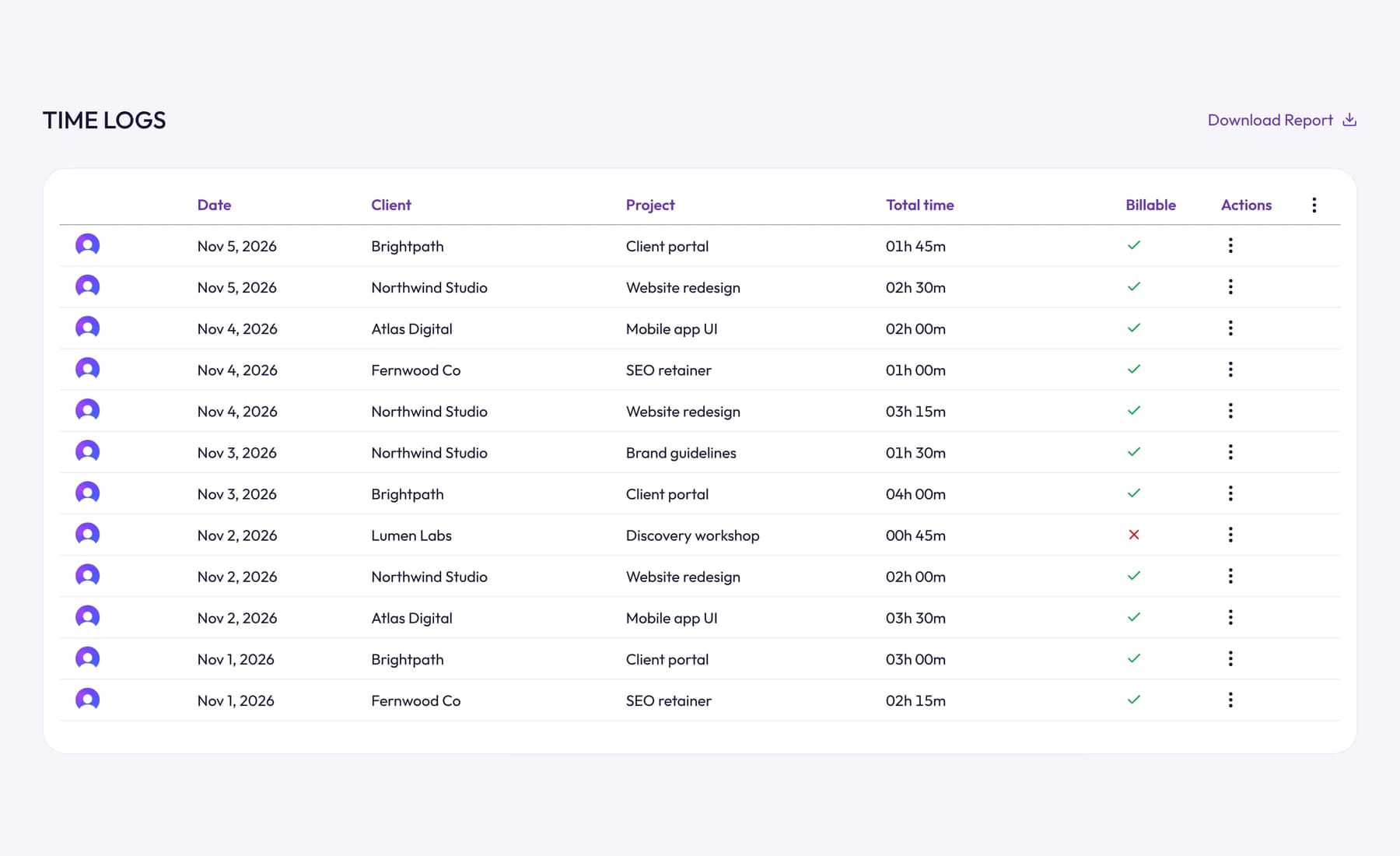
The full details are on how tracking works and our security page; share them with your team. For distributed teams, see how to manage a remote team.
Frequently asked questions
Is time tracking the same as employee monitoring?
No. Time tracking records hours against work, usually entered or started by the person. Employee monitoring records the person's behaviour, such as their screen, apps or keystrokes. Some time trackers include optional monitoring features, so check which ones are switched on.
What's the least invasive way to track a remote team?
Time entries against client, project and task, with weekly reviews of projects rather than people. Add activity levels or screenshots only where a client contract or a specific problem calls for them, and only for the people involved.
Wrap up
The line between time tracking and employee monitoring is whether the tool records the work or the person, whether people know and control what's captured, and whether a human makes the decisions. In 2026, California and the EU started drawing it in law, especially around AI.
Pick the lightest tracking that answers your question, write down why, and let people see their own data. To see exactly what Tristiks Grow records and what it never does, read how tracking works or explore activity tracking and start a 14-day free trial.
Category: Time Tracking
Suraj Rao
Suraj Rao is the founder of Tristiks, the team behind Tristiks Grow and its desktop time tracker OneTrack. He writes about time tracking, client work and getting paid, and about DevOps, cloud and AI from years of building software.