Harvest's Price Increase: What Changed and What to Do
 By Suraj Rao11 min read
What You'll Learn
- After Bending Spoons bought Harvest in 2025, pricing moved to a per-seat base rate plus usage fees for projects, clients, tasks and invoices, and some customers reported renewal bills many times higher.
- Your real cost depends on your plan, billing option, seats and usage, so check your billing screen and renewal email before you decide anything.
- You can ask Harvest for a better plan, cut usage, pay annually, stay or move, but export your time entries, clients, projects, invoices and expenses first either way.

If you just opened a Harvest renewal email and the number looks wrong, you're not alone. Since Bending Spoons bought Harvest in 2025, Harvest has moved to a new pricing model, and a number of long-time customers have reported renewal bills several times what they used to pay.
This post covers what changed, who seems affected, how to work out what you'll actually pay, your options and how to export your data before you decide.
One disclosure: we make Tristiks Grow, a time tracking and invoicing tool, so we're not neutral. Every fact about Harvest here is linked to Harvest or to published reports. Prices were checked in November 2026.
What happened to Harvest's pricing
Here's the sequence, as reported.
Bending Spoons bought Harvest in 2025. Bending Spoons, the Italian company that also owns Evernote and WeTransfer, completed the acquisition in July 2025, with terms not disclosed.
The pricing model changed. Harvest used to charge a flat price per seat. Its pricing page now says the base rate covers core features and that "additional invoices, projects, clients, and tasks are billed based on what you use." As listed in November 2026, there's a Free plan (1 seat, 2 projects), Teams from $9 per seat a month and Enterprise from $14 per seat a month, both billed annually. Monthly billing costs more per seat.
Several reviews describe two ways the usage part is billed: Flex, where active projects, clients, tasks and invoices sent above an allowance are each charged and added together, and Unlimited, which swaps those for one fixed usage fee. Several reviews note that Harvest doesn't publish its per-unit usage rates on the pricing page.
Customers started reporting big jumps. In August 2026, the BBC reported on UK consultancy Salentis, whose average monthly Harvest cost went from about $130 to $2,110, roughly 1,500% more, as summarised by Silicon UK and Subscription Insider. After the company pushed back, Harvest reportedly offered $1,309 a month for the next year if paid upfront.
The reports continued into November. In a widely shared post, RIP, Harvest, Kyle Kingsbury, who blogs as aphyr, wrote that Harvest moved him to an "enterprise" plan with "unlimited" usage billing, taking his bill from $13.32 to $133.98 a month. In the Hacker News discussion of that post, some commenters questioned how that figure related to the public prices, while others described similar usage-based totals on their own renewals. We can't verify individual bills, so treat each one as one customer's account.
Support replies changed too. The same post says emails to Harvest support got long replies from a language model rather than a person. One Hacker News commenter said a human did reply eventually.
Harvest's side. Harvest told the BBC that the steepest increases hit customers on outdated legacy plans, some dating back to 2011, and that the product has become much more capable since then. It also said customers are emailed 30 days and again 10 days before renewal, and can change plans or ask for a better-priced option.
None of this makes Harvest a bad product. It still does time, invoices and expenses well. But if you've been paying a legacy price for years, your next renewal may look very different. Harvest isn't alone, either: we've tracked why freelance software keeps getting more expensive across several tools.
Who seems affected, and why bills differ so much
Reported increases range from modest rises to well over 1,000%. Based on what's been published, three things seem to drive the difference.
- How old your plan is. By Harvest's own account, customers on legacy plans saw the largest increases. If you signed up years ago and never changed plan, you were likely paying well below today's list price.
- How much you "use". Under usage billing, the bill depends on active projects, clients, tasks and invoices, not just seats. So a solo freelancer with many small clients and lots of invoices may pay more in usage than a larger team on a few big projects.
- Which plan and billing option you land on. Moving from a legacy plan to Enterprise, or to Unlimited usage billing, changes the total, so check which plan your renewal email names.
So two similar Harvest accounts can see very different numbers. Don't rely on someone else's figure; work out your own.
How to check what you'll actually pay
Before you react, gather the real numbers. Harvest's exact screens may differ by plan, so treat these as things to look for rather than exact menu paths.
- Read the renewal email. Note the plan named, the renewal date, the total and whether it's monthly or annual. Harvest says it sends these 30 and 10 days ahead.
- Open your billing settings. Harvest's billing area should show your plan and, under usage billing, your active projects, clients, tasks and invoices for the last period. That's the most reliable source for your own account.
- Count your seats. Is everyone who has a seat still tracking time? Former contractors and people who only look at reports may be taking up paid seats.
- Count your usage. How many projects and clients are active? Are there old tasks or finished projects still marked active? How many invoices did you send last period?
- Compare monthly and annual. Harvest lists lower per-seat prices on annual billing, but it commits you for a year. Ask how usage is charged on an annual plan.
- Work out a yearly figure. Multiply your expected monthly total by 12 (or take the annual quote) so you can compare like with like against any alternative.
If a number doesn't make sense, write down what you expected and what you see. You'll need it next.
Your options
You have more choices than "pay it" or "leave tonight".
| Option | Pros | Cons |
|---|---|---|
| Ask Harvest for a better plan | Often the quickest fix; Harvest says it offers plan changes and better-priced options, and at least one business got a lower quote | Depends on support response; a discount may be for one year only |
| Reduce seats and usage | Cuts the bill without changing tools | Archiving projects or clients may change your reporting; usage can creep back |
| Switch plan or billing option | Teams may cost less than Enterprise if you don't need Enterprise features | You may lose features such as timesheet approval, which Harvest lists on Enterprise |
| Pay annually | Lower listed per-seat price; a known cost for the year | Commits you for 12 months; check how usage is charged within the term |
| Stay as is | No disruption, no retraining | The price may change again at the next renewal |
| Move to another tool | A chance to pick a pricing model you can predict | Setup time, a learning curve and a cut-over to manage |
Ask Harvest first
Even if you plan to leave, asking costs nothing. Be specific: your current plan, your old price, the new price, how many seats and active projects you have, and what you'd need to stay. Ask:
- Which plan and billing option would be cheapest for my usage?
- Can I stay on Teams instead of Enterprise?
- Is there a discount for paying annually, and is it for more than one year?
- What exactly counts as an active project, client or task?
If you get an AI reply that doesn't answer the question, reply asking for a person and restate the numbers.
Reduce what you pay for
Remove seats nobody uses, archive finished projects and inactive clients, and tidy up task lists. Check how Harvest counts "active" before you archive anything, and export first (see below) so nothing is lost from your reports.
Stay
If Harvest still fits and the new price is acceptable, staying is a reasonable choice: switching has a real cost in time. Set a reminder a month before the next renewal to check the price again.
Move to another tool
If the new price doesn't work, or you no longer trust it to stay predictable, move. Our Harvest alternatives guide compares six tools, our list of the best time tracking apps covers more, and our step-by-step guide on how to switch time tracking software covers the move itself.
What to look for in a replacement
If you leave, pick a tool you won't have to leave again in a year. Check these against each tool's own pricing page.
- Time, invoices and expenses together. That's the core of what Harvest does. If a tool only tracks time, you'll need a second tool and a way to get hours onto invoices.
- Pricing you can predict. Can you work out your bill from the pricing page alone, at your size today and in a year? Watch for caps on clients, projects or invoices, which can become the same surprise later. Our guide to per-seat vs flat pricing shows how to compare costs for a team of your size.
- Billable rates per client, so hours turn into invoice amounts without a spreadsheet (see different rates for different clients).
- Data export. Make sure you can get your time entries, invoices and expenses out as CSV, so leaving is easy if prices change again.
- Migration help. Check whether the new tool imports Harvest data or helps you move it. Not every tool does, so you may set up clients and projects by hand.
- A trial long enough to run a full week of real work and send at least one invoice.
How to export your Harvest data before you decide
Do this now, whatever you choose. If you stay, you have a backup. If you leave, you have everything you need, and you won't be negotiating against a deadline.
The paths below are from Harvest's help article on exporting data and related help pages at the time of writing. Menus may change, and some exports depend on your role and plan (administrators can export everything; managers and members see less).
- Time entries: run the detailed time report (Reports, then a new Detailed time report), set the date range to cover your whole history, and export to CSV or Excel. The Custom export option lets you choose which columns are included. See Harvest's guide to detailed reports.
- Expenses: run the detailed expense report and export to CSV or Excel. A PDF export also includes receipt images, which is worth keeping for your records.
- Invoices: from the invoice report, export to CSV or Excel (one row per invoice), and export line items separately if you need them. Harvest's help also describes an "Export all invoices" option under Settings, then Import/Export, which gives you a zip file of invoice PDFs.
- Clients: export your client list from the Clients page under Manage, as CSV or Excel.
- Projects: Harvest has described an export of detailed entries from each project's page. Note each project's budget, estimate and rates too, since you'll need them to set up projects elsewhere.
Then open each file, check the date range and totals against Harvest, and store everything somewhere backed up. If an export is missing, ask Harvest support before your plan changes.
How Tristiks Grow helps
If you decide to move, Tristiks Grow is one option with the same core as Harvest: time, invoices and expenses in one place.
- A flat price per plan, not per seat or per use: Solo is $12 a month for 1 seat, Professional is $19 a month for up to 3 seats, and Advanced is $39 a month for up to 10 seats. Unlimited clients and projects on every plan, with no usage charges. Paying yearly saves 12%. See pricing.
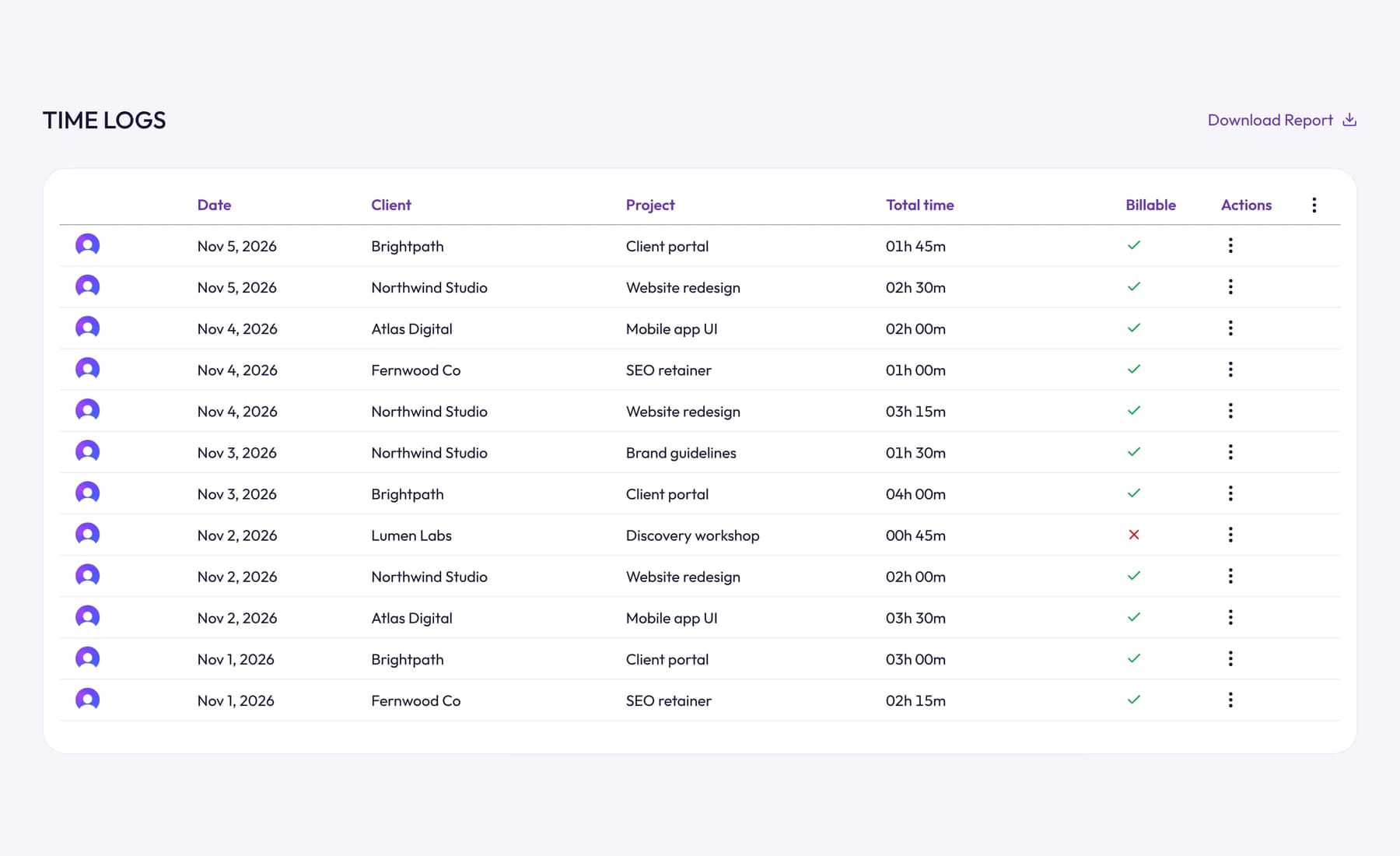
- Time tracking linked to invoicing: a one-click web timer, manual entries and a time log, billable or non-billable per entry, and each client's hourly rate saved, so invoices are built from tracked hours and unbilled expenses at that rate.
- Expenses with receipt scanning, marked billable and added to the client's next invoice.
- CSV exports of your time log, expenses and invoices, so your data is never stuck.
- Account migration support on the Advanced plan, to help move your data in.
There's a 14-day free trial with no card needed, so you can run a week of real work alongside Harvest before your renewal date. For a side-by-side view, see Tristiks Grow vs Harvest.
Frequently asked questions
Did Harvest raise prices for everyone?
Not by the same amount. Harvest told the BBC the largest increases hit customers on old legacy plans. Because part of the bill is now based on usage, two accounts with the same number of seats can pay very different amounts. Some customers have reported modest rises, others many times their old price.
Why doesn't my bill match Harvest's pricing page?
The pricing page shows the per-seat base rate. Usage charges for active projects, clients, tasks and invoices come on top, and Harvest doesn't publish the per-unit rates there. Your billing settings and renewal email are the places to see your real total.
Can I go back to my old Harvest plan?
We haven't seen anything from Harvest saying legacy plans can be kept. Harvest has said customers can change plans and ask for a better-priced option, so ask support directly what's available for your account.
Should I cancel Harvest straight away?
Not before you've exported your data and set up whatever comes next. Finish or send any open invoices first, pick a cut-over date at the start of a billing period, and run your new tool alongside Harvest for a week if you can. Our guide to switching time tracking software walks through each step.
Wrap up
Harvest's new pricing combines a per-seat base rate with usage fees, and for some long-time customers that has meant a much bigger bill. Start with the facts for your own account: your plan, seats, usage and renewal date. Ask Harvest for a better option, trim what you pay for, and export your data either way.
If you decide to move, compare tools on predictable pricing and easy exports, not just features. To see how a flat price works with time tracking, invoicing and expenses in one place, try Tristiks Grow's timesheet software free for 14 days.
Category: Time Tracking
Suraj Rao
Suraj Rao is the founder of Tristiks, the team behind Tristiks Grow and its desktop time tracker OneTrack. He writes about time tracking, client work and getting paid, and about DevOps, cloud and AI from years of building software.