Billable vs Non-Billable Hours: What Counts?
 By Suraj Rao11 min read
What You'll Learn
- Billable hours are the ones your client has agreed to pay for; non-billable hours split into unbilled client work and internal work, and they need different fixes.
- Gray areas like travel, revisions, onboarding and email aren't billable or non-billable by nature: your contract decides, so write the rule down.
- Track non-billable time by type and review it monthly, because the biggest category is usually one you can shrink, batch or start charging for.

Every hour you work is either billable or it isn't. That sounds simple until you hit the 20-minute email to a client, the train to their office or the third round of revisions. Those are the hours that cause arguments, and the ones that quietly lower what you earn.
The answer to "is this billable?" is rarely in the work itself. It's in what you agreed with the client. The same call can be billable for one client and included in the price for another.
This post covers the definitions, a quick test for any task, a categorization table for common work, how to handle the gray areas one by one, what ratio of billable to non-billable time is realistic and how to make non-billable time visible so you can do something about it. For utilization formulas, rounding and showing hours on an invoice, see our complete guide to billable hours.
Billable vs non-billable: the definitions
Billable hours are hours spent on work a client has agreed to pay for, at an agreed rate. They end up on an invoice, either line by line or as the basis for a fixed fee.
Non-billable hours are hours you work but don't charge anyone for. It helps to split them in two, because they have different causes and different fixes:
| Type | What it is | Examples | The usual fix |
|---|---|---|---|
| Non-billable client work | Work for a client that you don't charge for | Extra revisions, quick favors, fixing your own mistakes, time over a fixed fee | Clearer scope, change requests, better estimates |
| Internal (overhead) work | Work that runs your business, not a client project | Sales, invoicing, admin, learning, internal meetings | Batching, templates, automation, pricing it into your rate |
The first type is the one to watch most closely. It's work the client receives but doesn't pay for, often without knowing. Tracking it is how you find out whether a client or a project type is costing you more than you thought.
A three-question test for any task
When you're not sure, ask these in order:
- Is it for a specific client's project? If no, it's internal and non-billable.
- Does your contract or proposal say this kind of work is charged? If yes, it's billable.
- If the contract is silent, would the client reasonably expect to pay for it? If yes, it's probably billable, but tell them before the invoice, and update your contract for next time. If no, log it as non-billable client work.
The third question is where most disputes start. The fix is to make it rare by writing your rules into the contract. Our guide to what to include in a freelance contract covers where those rules go.
A categorization table for common work
Here's how freelancers and agencies commonly categorize everyday work. Treat it as a starting point; your contract wins.
| Activity | Usually | Common approach |
|---|---|---|
| Core project work (design, writing, code, analysis) | Billable | Billed in full |
| Client calls and meetings about the project | Billable | Billed in full, often with a minimum increment |
| Project management for the client | Billable | Billed in full or as a percentage on top |
| Research specific to the client's project | Billable | Billed in full |
| Revisions within the agreed rounds | Billable | Included in the quote or billed hourly |
| Revisions beyond the agreed rounds | Depends | Billed as a change request once approved |
| Client email and chat | Depends | Billed in increments, or included in the rate |
| Travel to the client | Depends | Full rate, reduced rate or expenses only |
| Onboarding and setup | Depends | Billed as a setup fee or absorbed |
| Waiting on the client or on-call | Depends | Billed only if a retainer or on-call rate says so |
| Fixing your own mistakes | Non-billable client work | Absorbed |
| Free "quick favors" | Non-billable client work | Logged, then charged or capped |
| Proposals and pitching | Internal | Priced into your rate |
| Invoicing and bookkeeping | Internal | Priced into your rate |
| General learning and training | Internal | Priced into your rate |
| Your own marketing and portfolio | Internal | Priced into your rate |
| Internal team meetings | Internal | Priced into your rate |
| Tool setup and IT problems | Internal | Priced into your rate |
The gray areas, one by one
Travel
Travel is time you can't spend on other clients, so many professionals charge for it. The usual options:
| Option | Works when |
|---|---|
| Bill travel at the full rate | You work on the way, or travel is rare and short |
| Bill at a reduced rate, such as half | Regular on-site visits with long journeys |
| Don't bill the time, bill the costs | Local clients, or competitive markets |
| Include it in a day rate | On-site workshops and full-day visits |
Whatever you choose, state it before the first trip, and record travel as its own entry so you can see what it costs you.
Revisions
Revisions inside the agreed rounds are part of the job. Revisions beyond them are new work. The trouble is the gray middle: "small tweaks" after sign-off. Define a revision round in your proposal, count them as you go and log extra rounds separately, even if you decide not to charge. Our guide to scope creep has a script for raising it with the client.
Onboarding and setup
Kickoff calls, getting access to systems, setting up files and learning a client's tools can take hours at the start of a project. You can bill it as a fixed setup fee, include it in the estimate as its own line, or absorb it for long relationships. The worst option is not counting it, because then it never makes it into the next quote.
Email, chat and quick questions
Short messages are where billable time leaks most. Three common policies:
Option A: All client communication is billable, in 6-minute increments.
Option B: Calls and meetings are billable; email and chat under
          10 minutes are included in the rate.
Option C: A monthly retainer covers communication up to X hours;
          anything above is billed at the hourly rate.
Any of these is fair if the client knows. Whatever your policy, log the messages that take real time, like writing a long explanation or reviewing a document someone sent you.
Project management
Coordinating people, updating timelines and preparing status reports is real work for the client. Agencies often bill it as its own line or as a percentage of the project. Freelancers often forget it entirely. If you track it separately for one project, you'll know what to estimate next time.
Waiting and on-call time
Being available but not working is billable only if the client agreed to pay for availability, such as an on-call rate or a retainer with guaranteed response times. Otherwise, waiting for content or feedback is non-billable, and the fix is a clause about delays, not a timer running while you wait.
What's a realistic ratio of billable to non-billable time?
Nobody is 100% billable. Someone has to find the next client and send the invoices. The question is what share of your working time can realistically be billable.
Published benchmarks give a sense of range, though they describe firms, not solo freelancers:
- Professional services firms. SPI Research's 2026 benchmark, as summarized by Deltek, reports average billable utilization of 66.4% in 2025, the lowest in the survey's history, against a 75% level SPI considers optimal (Deltek: billable utilization hits a historic low).
- Law firms. Clio's 2026 Legal Trends Report projects a utilization rate of about 42% of an eight-hour day for 2026, or about 3.4 billable hours, based on data from firms using Clio (Clio: 2026 Legal Trends Report press release). Clio's benchmarks page lists a lower 2025 average of about 38% (Clio: law firm key performance indicators).
Freelancers do their own sales, admin and invoicing, so a lower share is normal. The right target is the one your hourly rate is built on. Our guide to agency utilization rate covers benchmarks by role, and how to calculate your hourly rate shows how billable hours feed into your rate.
What the ratio means in money
Say you work 40 hours a week and charge $80 an hour. Here's what different billable shares mean, before costs:
| Billable share | Billable hours a week | Weekly billings | Earned per hour worked |
|---|---|---|---|
| 50% | 20 | $1,600 | $40 |
| 60% | 24 | $1,920 | $48 |
| 70% | 28 | $2,240 | $56 |
Moving from 50% to 60% billable is worth $320 a week in this example, without working a minute longer. That's why non-billable time deserves the same attention as billable time. Our guide to your effective hourly rate goes further into this.
How to make non-billable time visible
You can't reduce what you can't see. Most people track billable work carefully and leave non-billable time as a blur. Here's how to change that.
1. Track everything, and mark each entry
Track non-billable work with the same timer as billable work, and mark each entry billable or non-billable as you go. Recording it at the time is much more accurate than estimating it at the end of the month.
2. Give non-billable work a few clear categories
Keep the list short so it gets used:
Internal: sales and proposals
Internal: invoicing and admin
Internal: learning
Internal: marketing
Internal: team meetings
Client (unbilled): extra revisions
Client (unbilled): quick favors and support
Client (unbilled): fixing our own mistakes
In most time trackers, the simplest way is a project or task for each category. For unbilled client work, track it on the client's own project and mark the entry non-billable, so you can see it per client.
3. Review it monthly, in money as well as hours
Add up each category at the end of the month and multiply by your rate. Seeing it in money changes how you think about it.
| Category | Hours this month | At $80 an hour |
|---|---|---|
| Sales and proposals | 14 | $1,120 |
| Invoicing and admin | 9 | $720 |
| Extra revisions (Client A) | 7 | $560 |
| Quick favors (Client B) | 5 | $400 |
| Learning | 6 | $480 |
| Total non-billable | 41 | $3,280 |
In this hypothetical month, 12 hours of unbilled client work cost $960. That's a conversation with two clients, not a productivity problem.
Doing it in Tristiks Grow
In Tristiks Grow, every time entry, whether from the timer or added by hand, is marked billable or non-billable, and only billable hours reach an invoice. The time log shows which is which at a glance.
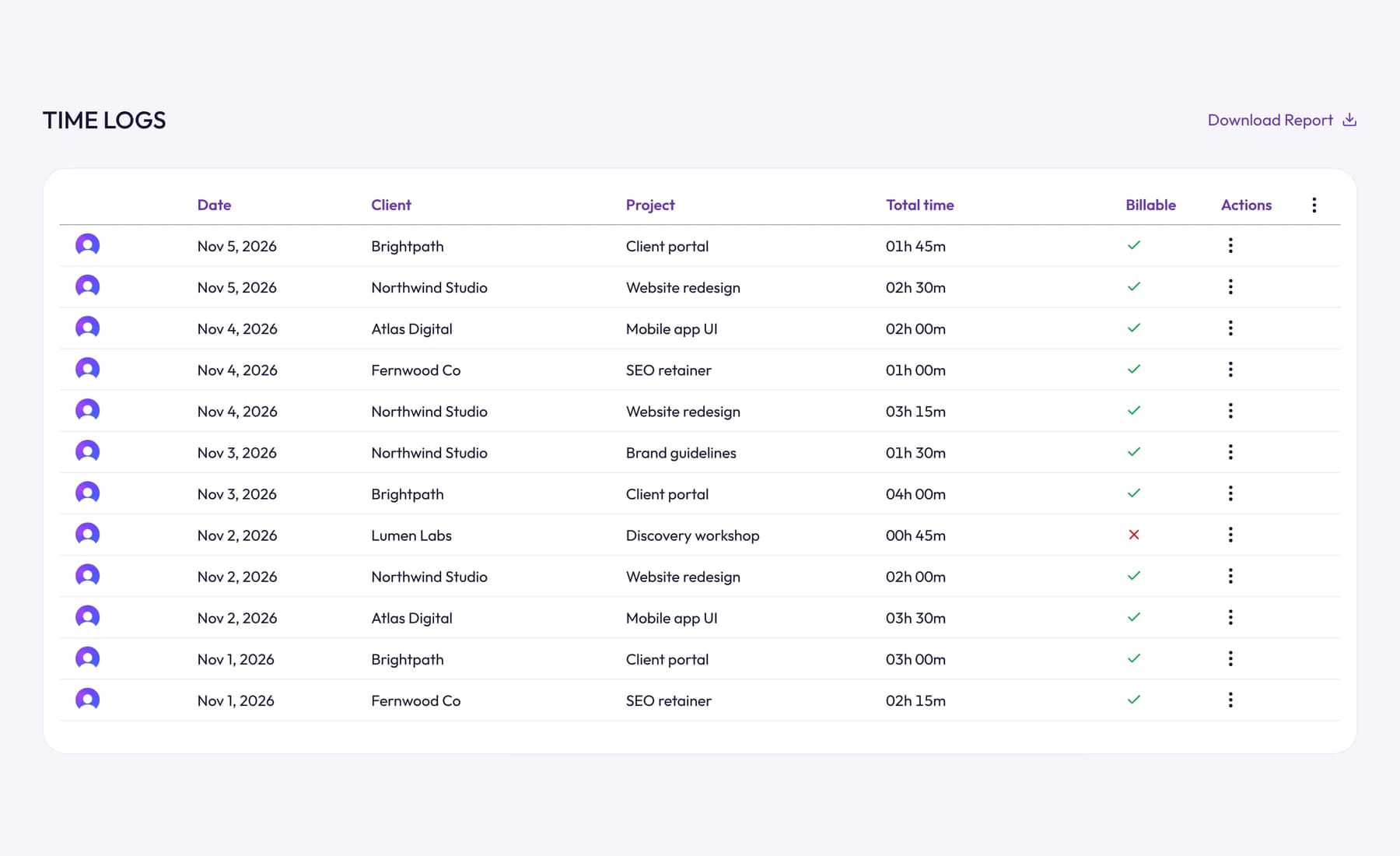
For a monthly review, download the time log as a CSV file. Each entry includes its teammate, date, client, project, task, description, length and billable status, so you can total non-billable hours by client or category in a spreadsheet. See time reporting for the other downloads, and timesheets for how entries are recorded.
What to do with what you find
Once non-billable time is visible, each category points to a fix:
- Unbilled client work keeps growing. Tighten the scope, count revision rounds and turn extras into change requests. A statement of work makes the boundaries clear from the start.
- One client takes far more unbilled time than others. Check what they really pay per hour of your time. Our guide to client profitability shows how.
- Admin is large. Batch it into one or two blocks a week, use templates and automate what you can, like recurring invoices and payment reminders.
- Sales takes a big share. That's normal when you're building a pipeline. Make sure your rate covers it.
- You've done all that and the share is still low. Raise your rate. Our guide on how to raise your rates covers how to tell clients.
Frequently asked questions
What is the difference between billable and non-billable hours?
Billable hours are time spent on work a client has agreed to pay for. Non-billable hours are time you work but don't charge for: internal work like sales, admin and learning, plus client work you choose not to charge, like extra revisions or fixing mistakes.
Is answering client emails billable?
It can be, if your contract says so. Many professionals bill calls and meetings but include short emails in their rate, while others bill all communication in small increments. Pick one policy, write it into the contract and tell the client before the first invoice.
Is travel time billable?
It depends on what you agree. Common options are billing travel at the full rate, at a reduced rate, charging only the travel costs, or folding it into a day rate. State the rule before the first trip.
Should I track non-billable hours?
Yes. Without them, you can't see how much of your week is billable, which clients take unpaid time or whether your rate covers the hours you can't charge. Mark them non-billable so they never reach an invoice.
Wrap up
Billable or not is a decision you make in the contract, not a property of the work. Agree the rules for the gray areas up front, track every hour, mark what's billable and review the non-billable time by type each month.
To mark every entry billable or not and bill only what you mean to, try Tristiks Grow timesheets free for 14 days.
Category: Time Tracking
Suraj Rao
Suraj Rao is the founder of Tristiks, the team behind Tristiks Grow and its desktop time tracker OneTrack. He writes about time tracking, client work and getting paid, and about DevOps, cloud and AI from years of building software.