Effective Hourly Rate: The Pay Cut in Fixed-Price Work
 By Suraj Rao11 min read
What You'll Learn
- Your effective hourly rate is what a project paid you, minus its expenses, divided by every hour it took, including calls, revisions and admin.
- Fixed prices and retainers hide overruns because the invoice never changes, so a $5,000 project that took 80 hours quietly pays $62.50 an hour, not $100.
- Track time on fixed-price work without billing it, compare each client's effective rate, then reprice, re-scope or change terms where it falls short.

Your effective hourly rate (EHR) is what a piece of work actually paid you per hour. You take the money the project brought in, subtract what it cost you, and divide by every hour you spent on it.
Here's why it matters. Say you quote a client $5,000 for a website, working from your usual rate of $100 an hour. You expect about 50 hours. The project drags on, the revisions pile up, and when you finally add up your time it comes to 80 hours. The client paid exactly what they agreed. You still took a pay cut:
$5,000 ÷ 80 hours = $62.50 an hourNobody sent you a smaller invoice. Nothing looked wrong. You just worked 30 hours for free, and at $100 an hour that's $3,000 you never see.
This post covers the effective hourly rate formula, a worked comparison of four clients, why fixed prices and retainers hide the problem, how to track fixed-price time without billing it, what to do when a client falls short, and how to quote the next project better.
What is effective hourly rate?
Effective hourly rate is your real earnings per hour on a project, client or period, after the work is done. Your quoted rate is what you plan to earn per hour; your effective rate is what you did earn. On fixed-price projects, retainers and anything with unbilled hours, the two can drift a long way apart, and they usually drift down.
If you haven't set a target rate yet, start there: our guide on how to calculate your hourly rate walks through the formula, and the free hourly rate calculator does the arithmetic from your income goal, costs and billable hours. Your target rate is the line you compare every EHR against.
The effective hourly rate formula
Here's the formula:
Effective hourly rate = (revenue − project expenses) ÷ total project hoursTwo words in that formula do the heavy lifting: expenses and total.
Count every hour the project took
"Total project hours" means every hour the project cost you, not just the core work. That includes calls and meetings, email with the client, every revision round, file prep and handover, invoicing and chasing payment, and fixing your own mistakes. Leave these out and your EHR looks better than it is, so you make the same pricing mistake next time.
Take out project expenses
Expenses are costs you paid because of this project: stock photos, font licenses, a plugin, a subcontractor, travel. If you passed them on to the client at cost, they cancel out. If they came out of your fee, they lower your rate.
Here's the $5,000 website again, with $200 of stock photos and fonts the fee had to cover:
($5,000 − $200) ÷ 80 hours = $4,800 ÷ 80 = $60.00 an hourAgainst a $100 target, that's a 40% pay cut on this project.
You can work out a business-wide EHR too, counting sales and marketing time that belongs to no client. That number tracks your utilization rate, which our complete guide to billable hours covers. For pricing decisions, the project or client version is more useful, because it tells you which work to change.
A worked example: four clients compared
Here's a hypothetical freelance designer with a $100 target rate, looking back over one quarter. She works with four clients on three different pricing models.
| Client | Model | Revenue | Expenses | Total hours | EHR | vs $100 target |
|---|---|---|---|---|---|---|
| A | Hourly, $100/hour | $4,000 | $0 | 46 | $86.96 | −13% |
| B | Fixed-price website | $5,000 | $200 | 80 | $60.00 | −40% |
| C | Retainer, $2,000/month × 3 | $6,000 | $0 | 72 | $83.33 | −17% |
| D | Fixed-price logo | $2,500 | $0 | 16 | $156.25 | +56% |
| Total | $17,500 | $200 | 214 | $80.84 | −19% |
Client A billed 40 hours, plus 6 unbilled hours of calls and invoicing. Client B is the website from the intro. Client C is a content retainer, and Client D a logo with a tight brief.
What the table shows
- Her biggest client isn't her best client. Client C pays the most, but Client D pays almost twice as much per hour.
- Even the hourly client falls short. Six unbilled hours took Client A from $100 to $86.96.
- One project drags the whole quarter down. Without Client B, her EHR would be $12,500 ÷ 134 = $93.28. One badly scoped project costs her more than $12 an hour across all her work.
None of this shows on her invoices. Every client paid in full and on time.
Why fixed-price and retainer work hides the pay cut
On hourly work, extra hours show up as a bigger invoice, and the client checks the timesheet. On fixed-price and retainer work, nobody checks.
The invoice never changes
A $5,000 project is a $5,000 invoice whether it takes 40 hours or 120. That's good for you when you work efficiently. It also means the overrun is silent. You find out only if you count.
The extra hours arrive in small pieces
Overruns rarely come as one big task. They come as a 20-minute call, a "quick" change, a third round of revisions. Each feels too small to matter. Together they're the difference between 50 and 80 hours. Our guide to scope creep covers how these requests build up.
Retainers drift upward
Retainers have the same problem, spread over months. Here's Client C from the table, month by month:
| Month | Fee | Hours | EHR |
|---|---|---|---|
| 1 | $2,000 | 20 | $100.00 |
| 2 | $2,000 | 24 | $83.33 |
| 3 | $2,000 | 28 | $71.43 |
| Quarter | $6,000 | 72 | $83.33 |
Month one was priced right. By month three, the same fee covers 40% more hours. Our comparison of retainers vs fixed-price projects covers how to write overage rules into a retainer so this can't creep up unnoticed.
How to track time on fixed-price work (without billing by the hour)
Tracking time doesn't mean billing by the hour. The client still pays the fixed fee. The hours are for you: to spot overruns early and to price the next project.
1. Set an hours budget before you start
Divide the fixed fee by your target rate. That's the most hours the project can take before you drop below target:
Hours budget = fixed fee ÷ target hourly rate
$5,000 ÷ $100 = 50 hours
2. Break the work into tasks, including the unglamorous ones
Create tasks for the core work, plus separate tasks for client calls, revisions and admin. Then the time log tells you not just that the project ran over, but where.
3. Track as you work
Start a timer when you start, stop it when you switch. Time pieced together on Friday always comes out short, and the missing minutes are the ones that hide the overrun.
4. Check weekly against the budget
Each week, compare hours used with work done. If you've used 70% of the hours and finished 40% of the work, you know now, not at handover. Our guide to project budgets shows how to read burn rate and what to do when it's running hot.
Doing it in Tristiks Grow
In Tristiks Grow you set an estimated time when you create a project, and it shows the time tracked against the project beside that estimate. Tasks can carry their own estimates, so you can see which part of the work is running over. Time goes in from the desktop app, the web timer or a manual entry, and lands on that client's timesheet. See project time tracking for how it works.
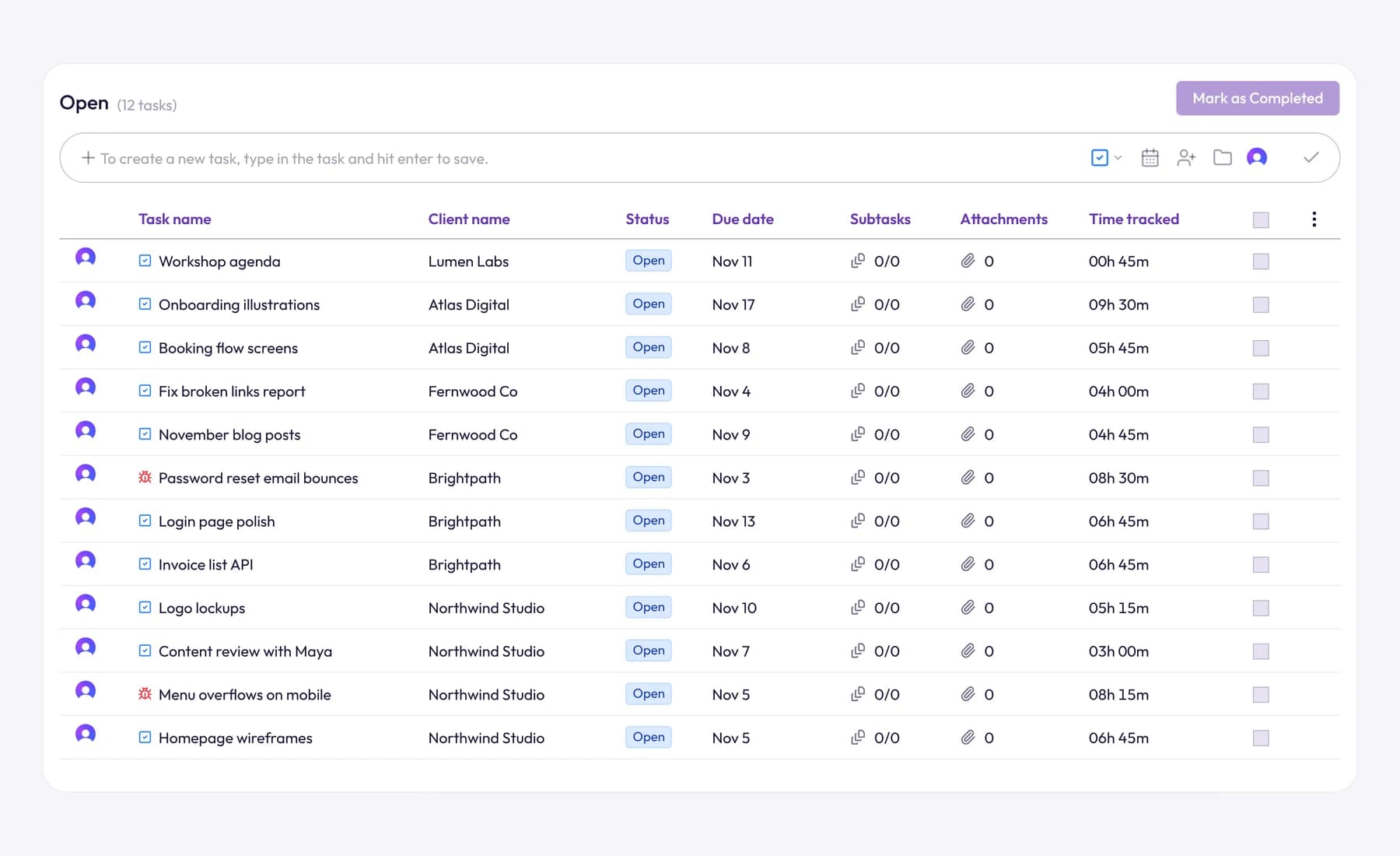
You don't have to put those hours on an invoice. You choose which tracked hours to bill, and you can mark entries billable or non-billable. For the fixed fee itself, you can split the project into scheduled payments, such as a deposit now and the balance on delivery, each with its own amount, send date and terms.
To see the EHR side, save your target rate as the client's hourly rate. Time reports use each client's rate to show what your hours earned, so you can set that figure beside the fixed fee you were actually paid. You can also export your time log and expenses as CSV files and do the division in a spreadsheet.
What to do when a project or client falls short
A low EHR on one project is information. A low EHR on the same client, project after project, is a pattern to change. Start by asking why the hours ran over, because the fix depends on the cause.
Reprice
If the work was what you agreed and it simply took longer, the price was wrong. Raise it on the next project, or at the retainer's renewal, using your tracked hours as the evidence.
Re-scope
If the client can't pay more, give them less. Cut deliverables, reduce revision rounds from three to two, or move extras into a later phase. A smaller scope at the same fee raises your EHR without a price conversation.
Change the terms
Some clients cost hours through how they work, not the work itself. Limit and price revision rounds, name one person who approves work, put calls on a schedule, and bill an unclear discovery phase hourly before fixing the price for the build. Our guide on what to include in a freelance contract covers how to write these in.
Add a change request process
Most overruns are small requests you said yes to without pricing. A change request process turns each one into a decision for the client. Agree it at the start, then use it every time:
Happy to add the pricing page. It's outside the current scope, so here's what it involves: about 6 hours of design and build, which is $600 at our project rate, and it would move launch by two working days. Reply "yes" and I'll add it to the plan and the next invoice. If you'd rather keep the original scope, we'll carry on as planned.
Drop the client
If you've tried the rest and a client still pays well below target, the most profitable move may be to stop. The hours you free up go to better-paying work, or to finding it. Give proper notice and leave on good terms.
Use your EHR to quote the next project better
The real value of tracking a fixed-price project is the next quote. Compare what you estimated with what happened, task by task.
Here's the $5,000 website, broken down:
| Task | Estimated hours | Actual hours | Difference |
|---|---|---|---|
| Discovery and brief | 4 | 5 | +1 |
| Design | 14 | 18 | +4 |
| Development | 22 | 26 | +4 |
| Revisions | 4 | 14 | +10 |
| Client calls and email | 3 | 10 | +7 |
| Admin and handover | 3 | 7 | +4 |
| Total | 50 | 80 | +30 |
The core work (discovery, design and development) was estimated at 40 hours and took 49, about 23% over. Revisions, calls and admin were estimated at 10 hours and took 31. Those three lines account for 21 of the 30 extra hours.
Two ways to quote the next similar project
Option 1: price what it really takes. Use the actual hours as the new estimate:
80 hours × $100 = $8,000, plus $200 expenses = $8,200Option 2: re-scope, then price. Keep the real 49 hours of core work, cap revisions at two rounds (8 hours), schedule calls (6 hours) and allow 5 hours of admin:
49 + 8 + 6 + 5 = 68 hours
68 hours × $100 = $6,800
Add a 10% buffer: $6,800 × 1.10 = $7,480, quoted as $7,500
If that project comes in at 68 hours, your EHR is $7,500 ÷ 68 = $110.29. If it runs to 75 hours, you're still at $7,500 ÷ 75 = $100. The buffer is what keeps you on target when the next surprise arrives.
Build your own overrun factor
After a few projects of the same type, divide actual hours by estimated hours for each. If your websites keep coming in at around 1.3 times the estimate, multiply the next website estimate by 1.3 before you price it.
Frequently asked questions
What is a good effective hourly rate?
A good EHR is one at or above the target rate your business needs to cover your income, costs and taxes. There's no universal number, because it depends on your costs and how many hours you can bill. Work out your target first, then judge every project against it.
Should I include non-billable time in my effective hourly rate?
Yes, for any time spent on that project or client: calls, email, revisions, admin and handover. Leave out general business time like marketing your own services, which belongs in a business-wide EHR instead. If you leave project admin out, you'll overestimate how well the project paid.
Should I tell clients my effective hourly rate?
Usually not. A fixed price is a price for a result, and the client doesn't need your hours to judge it. Use your EHR privately to decide what to quote, what to scope and which clients to keep.
Does effective hourly rate include taxes?
The simple version works on revenue before income tax, like your quoted rate, and your target rate should already allow for taxes. How tax applies to your business depends on where you are, so check with an accountant.
Wrap up
A fixed price that feels like good money can still pay you well below your rate once every call, revision and expense is counted. The only way to know is to track the hours, divide, and compare each project and client against your target. Then reprice, re-scope, change terms or walk away where the numbers don't work.
To see where each fixed-price project stands while there's still time to act, try project time tracking in Tristiks Grow free for 14 days, with estimates next to tracked time on every project.
Category: Time Tracking, Payments
Suraj Rao
Suraj Rao is the founder of Tristiks, the team behind Tristiks Grow and its desktop time tracker OneTrack. He writes about time tracking, client work and getting paid, and about DevOps, cloud and AI from years of building software.