Change Orders for Freelancers and Agencies (With Template)
 By Suraj Rao11 min read
What You'll Learn
- A change request is the client's ask. A change order is the signed answer: what changes, what it costs, how the deadline moves, approved before you start.
- Price changes from your own tracked hours on similar work, and include the rework, project management and any rush premium, not just the new task.
- Write the process into your SOW and contract, log every request, keep each change as its own task and invoice line, and never start before the client signs.

A change order is a short written agreement that changes the scope, price or timeline of a project you've already agreed with a client. It describes the new or changed work, its cost, its effect on the deadline, and it's signed by the client before you start. A change request is the client's ask; the change order is your priced, approved answer to it.
Change orders turn "Can you just add...?" into paid work instead of free work. This guide covers when you need one, a copy-paste template, how to price changes from tracked hours, scripts for the conversation, the process from request to invoice, how it ties into your SOW and contract, and the mistakes to avoid.
Change request vs change order
| Change request | Change order | |
|---|---|---|
| What it is | A proposal to change the work | The approved, priced change |
| Who starts it | Usually the client (sometimes you) | You, in reply to the request |
| What it contains | What they want and why | Scope, price, timeline and signatures |
| Binding? | No | Yes, once both sides sign |
Accelo puts it simply: a change request is a proposed change, and an approved change order is the commercial record that authorizes the work. The request on its own is never permission to start.
The idea comes from construction. The standard US form, the AIA G701 Change Order, records a change in the work and the adjustment to the contract price and time, signed by the owner, contractor and architect. In the UK it's often called a variation. Client work borrowed the idea because the problem is the same: work that wasn't priced at the start.
When you need a change order (and when you don't)
You need one whenever a request changes what you deliver, what it costs or when it's due. Uncontrolled change is common: PMI's 2018 Pulse of the Profession found that 52% of projects experienced scope creep, up from 43% five years earlier. Our guide to what scope creep is covers the warning signs.
| Request | Change order? |
|---|---|
| A new page, feature, deliverable or integration | Yes |
| A fourth revision round when the contract includes two | Yes |
| Moving the deadline earlier | Yes, usually with a rush fee |
| Client delays that push your schedule or cause rework | Yes, for the new dates (and cost, if any) |
| Removing part of the scope | Yes, as a credit |
| Fixing a bug or mistake in your own work | No, that's in scope |
| A five-minute tweak you're happy to absorb | No, but say it's a one-off |
When in doubt, check the request against your statement of work. If the SOW doesn't list it, or lists it as excluded, it's a change.
What a change order should include
Harvest's change order template lists the essentials: project details, a description of the change, a cost breakdown, the timeline impact and signatures. For client work, also add what the change removes, how it's billed and how long the quote is valid:
CHANGE ORDER #[number]

Project:          [project name]
Client:           [client company], [contact name]
Original agreement: [SOW or contract name], dated [date]
Date issued:      [date]
Requested by:     [name], on [date], by [email / call]

1. Description of the change
   [What will be added or changed, in plain words. Be as specific
   as the original scope: pages, features, rounds, formats.]

2. What this replaces or removes (if anything)
   [Items removed from the original scope, or "Nothing."]

3. Price
   [Fixed price: $X]  or  [Estimate: X hours at $Y/hour = $Z,
   billed on actual hours, not to exceed $Z without approval]

4. Timeline
   [Effect on milestones and final delivery date, e.g.
   "Launch moves from 12 March to 18 March."]

5. Billing
   [Added to the next milestone invoice / invoiced on approval /
   50% on approval, 50% on delivery]

6. Assumptions
   [What the price depends on, e.g. "Client supplies copy by 3 March."]

7. Validity
   This change order is valid for 14 days from the date issued.
   Work on the change starts once it is signed.

All other terms of the original agreement stay the same.

Approved by (client): ____________________  Date: __________
Approved by (us):     ____________________  Date: __________
Keep it to one page. The client should be able to read and sign it in two minutes.
How to price a change
Start from how long similar work actually took you, from your tracked hours, not how long it feels like it should take. Our guide to estimating project hours covers three-point estimates and buffers. Then add the costs that exist only because the change came late:
- Rework: pages, designs or code already finished that now need updating.
- Project management: the extra calls, emails, testing and handoffs.
- Rush: if the client wants the extra work without moving the deadline, you're working evenings or bumping another client.
- Third-party costs: new fonts, plugins, stock photos, subcontractor time.
Worked example: adding a blog to a fixed-price website
A web designer is midway through a $9,000 fixed-price website at an internal rate of $90 an hour. The client asks to add a blog with three templates.
Similar work from tracked time:
  Blog templates, Project A    14.5 h
  Blog templates, Project B    16.0 h
  Blog templates, Project C    12.5 h
  Average                      14.3 h  -> estimate 15 h

New work                       15 h
Rework: navigation, footer      2 h
Project management and QA       2 h
Total                          19 h x $90 = $1,710

Option A: $1,710, launch moves 4 working days later
Option B: keep the launch date, +25% rush = $2,137.50
Option C: swap in the blog, drop the testimonials page
          (6 h, $540 credit) = $1,170, launch moves 2 days
Options work better than a single number: the conversation becomes about choices, not whether you're "allowed" to charge.
Hourly vs fixed price
On a fixed-price project, quote each change as a fixed price, with a buffer, since you carry the risk. On an hourly project, you still need a change order when the change affects the budget or deadline the client planned around. Give an estimate and a cap: "about 12 hours, not to exceed 15 without your OK." Our post on project budgets shows how to spot that point.
How to say it to the client
Most clients don't mind paying for changes; they mind surprises. Say it early and plainly.
When the request arrives (same day):
"Good idea, and it'll work well with the rest of the site. A blog wasn't part of the original scope, so I'll send you a short change order tomorrow with the cost and how it affects the launch date. I'll keep going on the agreed pages in the meantime."
When you send the change order:
Subject: Change order #2: blog section
Hi Sam,
As promised, here's the change order for the blog. In short: three templates for $1,710, with launch moving from 12 to 18 March. If the date matters more, there are two other options inside, including swapping the blog for the testimonials page.
Once you sign, I'll schedule the work. The quote is valid for 14 days.
Thanks, Alex
When the client says "I thought that was included":
"I can see why, so let me check. Section 2 of the SOW lists the five pages we agreed, and the blog isn't one of them. I'm happy to add it; the change order has the cost and two other options. Shall we go through them on a quick call?"
If a client argues every change, see handling difficult clients and setting client boundaries.
The process: from request to invoice
A repeatable process makes change orders feel routine, not confrontational, as Teamwork's guide to change request management also argues.
- Get the request in writing. If it came on a call, confirm it by email.
- Log it, even if you'll decline it. Productive recommends logging every change request the day it arrives, including the ones you turn down.
- Check it against the SOW. In scope, out of scope, or a swap?
- Estimate hours, cost and timeline impact.
- Send the change order within the time your contract promises, such as 3 working days.
- Get a signature before any work starts.
- Update the plan: add the work as its own task, adjust the budget and the deadlines.
- Track time against the change separately from the original scope.
- Invoice it as its own line item, on the agreed schedule.
A change log keeps every decision in one place:
| # | Date | Change | Price | Timeline | Status |
|---|---|---|---|---|---|
| 1 | 3 Feb | Extra revision round on logo | $380 | +2 days | Signed 4 Feb |
| 2 | 19 Feb | Blog section (option A) | $1,710 | +4 days | Signed 20 Feb |
| 3 | 2 Mar | Live chat widget | None | None | Declined |
Link it to your SOW and contract
A change order only works if the original agreement says how changes happen. Put a change control clause in your SOW or contract, so the process is something both sides agreed to before anyone asked for anything. Our guides to the statement of work and what a freelance contract should include show where it sits.
Changes to the scope
Either party may request a change to the scope, deliverables or timeline in writing. Within 3 working days of a request, [Agency] will send a change order describing the change, its price and its effect on the timeline. Changes are priced at [Agency]'s rate of $[rate] per hour or as a fixed price stated in the change order.
Work on a change starts only after the Client's project lead signs the change order. Signed change orders form part of this agreement. Delays caused by late feedback or materials from the Client may move the timeline, and [Agency] will confirm any new dates in writing.
Name the person who can approve changes, so a junior contact can't commit the budget, and if your contract says amendments must be signed, sign change orders rather than agreeing them in chat. This is general information, not legal advice.
Retainers, fixed price and hourly: what changes
| Project type | When you need a change order |
|---|---|
| Fixed price | Any addition to the agreed deliverables, extra revision rounds, earlier deadlines |
| Hourly (time and materials) | When the change affects the budget cap or the deadline the client planned around |
| Retainer | Work beyond the monthly hours or outside the services the retainer covers |
On a retainer, a request inside the monthly hours doesn't need a change order, but it pushes other work back, so tell the client what moves. A one-off build on a content retainer is a separate change order or quote. See retainers vs fixed-price projects and capacity retainers for how to set retainer terms.
Common mistakes
- Starting before the signature. Once the work is done, you've lost your leverage on price.
- Pricing only the new task, and not the rework and management around it.
- Leaving out the timeline. A free change that moves the launch still needs approval.
- Saving changes for the final invoice. A surprise total at the end damages trust more than five small change orders along the way.
- Not tracking change work separately, so you can't tell whether the change was profitable. Our guide to project profitability shows why it matters.
- Doing favors silently. If you absorb a change, say "no charge this time" so the next request starts from the right place.
How Tristiks Grow helps
Tristiks Grow doesn't have a separate change order document, but a short proposal does the job:
- Proposals with a pricing table, with line items, taxes and the client's currency. Use the template above as the proposal's sections.
- Sent as a link that shows as viewed when opened. The client signs online by typing their name, and the signed version is locked.
- A draft invoice on signing, with the same line items, if you turn that option on before sending.
- Time tracked per task, so the change gets its own task, and reports by client and project show what it took and earned.
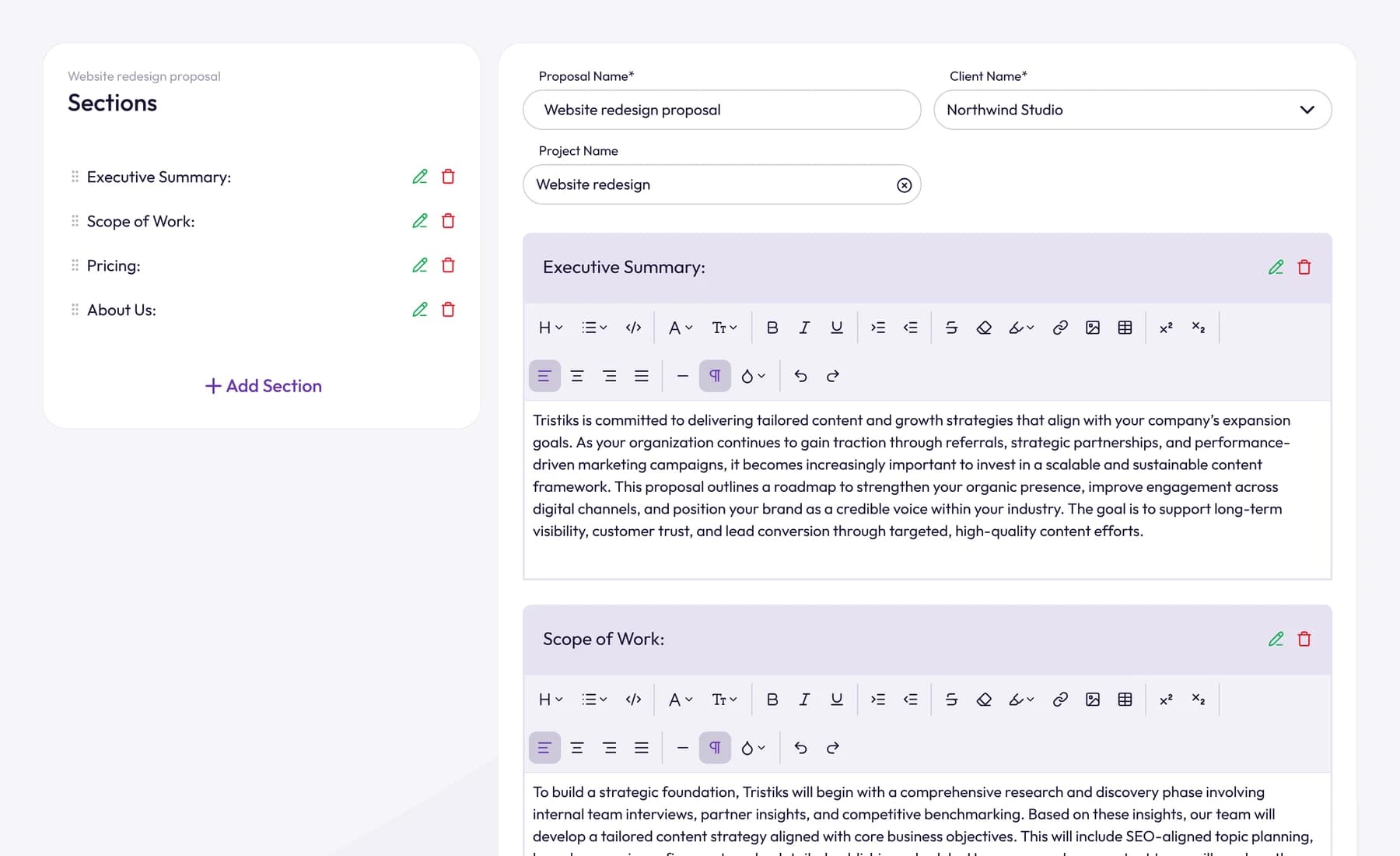
See proposal and contract software for how sending and signing works.
Frequently asked questions
Is a change order legally binding?
Once both sides sign it, a change order usually becomes part of the original contract, especially if the contract says so. Follow whatever your contract says about amendments, and get legal advice for large or disputed changes.
Can a change order reduce the price?
Yes. If the client removes part of the scope, issue a change order with a credit and the new total. It keeps the record straight and shows you're fair in both directions.
What if the client wants the change but won't sign?
Don't start the work. Ask what's holding them back, offer a cheaper option or a swap, or suggest moving the change to a second phase. Work done without approval is the hardest to get paid for.
Do I need a change order for small changes?
Not for every five-minute tweak. Decide on a small goodwill allowance, say so when you use it, and batch anything bigger into a weekly change order.
Wrap up
A change order is a one-page agreement that turns an extra request into priced, scheduled, signed work. Put a change clause in your SOW, price changes from your tracked hours, give the client options and never start before the signature.
To send change orders the client can sign online and track the time each change takes, try Tristiks Grow free for 14 days.
Category: Client Management
Suraj Rao
Suraj Rao is the founder of Tristiks, the team behind Tristiks Grow and its desktop time tracker OneTrack. He writes about time tracking, client work and getting paid, and about DevOps, cloud and AI from years of building software.