Upwork Time Tracker Alternative for Direct Clients
 By Suraj Rao11 min read
What You'll Learn
- Clients like Upwork's Work Diary because it gives them visibility and evidence, and because Upwork acts as referee. Off the platform, you have to rebuild that trust yourself.
- Replace it with a written tracking policy agreed in the contract, a regular report the client can read, and invoices that show the hours behind every line.
- Screenshots and activity levels can help, but activity isn't productivity, so agree what's captured, who sees it and how private captures get deleted before you start.
Clients used to Upwork are used to proof: every billed hour comes with a Work Diary of screenshots, activity levels and memos. When you work with a client directly, or a new client asks for "something like Upwork's tracker", you need a replacement that gives them the same confidence.
The tracking app is the easy part. What clients really rely on is a system: a record they can check, rules both sides agreed to, and someone to settle an argument. Off-platform, you rebuild that with a written tracking policy, regular reports and invoices that show the work.
This guide covers what the Work Diary gives clients, what you lose off the platform, four ways to prove your hours compared, what activity tracking can't tell anyone, and a tracking clause to copy.
How Upwork's Work Diary works
Here's what Upwork's help pages describe (checked November 2026). Upwork changes its rules from time to time, so check the current pages.
- Screenshots. The Upwork desktop app takes about six screenshots an hour while the timer runs, one at a random moment in each ten-minute block.
- Activity levels. It counts keyboard and mouse activity in each ten-minute block and shows it on an activity meter. Upwork says it counts activity, not what you typed or clicked.
- Memos. You describe what you're working on. Upwork's help pages say memos are needed for time to qualify for Hourly Protection.
- Deleting captures. You can delete a screenshot, but that ten-minute block of time goes with it, so you aren't paid for it.
- Manual time. A client can allow manual time on a contract, but Upwork says manual time isn't covered by Hourly Protection. Only time tracked in the desktop app qualifies.
The client can review the Work Diary: screenshots, activity and memos for every block. If they think the hours don't match the work, they can dispute them in a review window after each weekly billing period. Upwork then checks the disputed time against its Hourly Protection rules and decides who's right. Its payment protection guide also says the time must stay within the contract's weekly limit.
Why clients like the Work Diary
Clients who like the Work Diary usually aren't trying to spy on anyone. They like it for three reasons.
- Trust with a stranger. Hourly work means paying for time the client can't see. The Work Diary lets a new client say yes to someone they met last week.
- Visibility between check-ins. A client can look at Tuesday's work without sending an email, which matters when you're in a different time zone.
- Evidence when something goes wrong. If the client thinks 30 hours is too many for the job, there's a record to look at, and a neutral party to look at it.
For freelancers, tracked hours that meet Upwork's criteria are protected even if the client doesn't pay. That's worth a lot.
What you lose when you work directly
Working directly usually means lower fees and a closer relationship. It also means you lose three things the platform did for you.
- Payment protection. Nobody guarantees payment for your tracked hours. If a client doesn't pay, you have what any business has: reminders, stopping work, collections or a small claims court.
- A referee. If a client disputes an invoice, there's no dispute team. It's your record against their memory, and then your contract.
- A shared, agreed set of rules. On Upwork, both sides accepted the same terms before the contract started. Off-platform, the only rules are the ones you write down.
One warning: if you met a client on Upwork, its terms restrict moving that relationship off the platform except through its contract conversion process, which carries a fee. Our guide on moving clients off Upwork covers the process. This isn't legal advice; read the current terms before you act.
How to replace the Work Diary off-platform
You can't recreate Upwork's referee, but you can make disputes rare by agreeing everything up front and making the work easy to check.
1. A written tracking policy, agreed in the contract
Most freelancers skip this, and it matters most. Before work starts, agree in writing:
- What's captured, and when. Time only, or time plus activity levels, or time plus activity and screenshots, and only while the timer runs.
- Who sees it. The freelancer, and the client or their named contact.
- How long it's kept, and what happens to it when the contract ends.
- How private captures are deleted. If a screenshot catches a bank login, you delete it and that time isn't billed.
- How manual time works. Calls and thinking away from the screen are real work. Say how you'll log them.
- How disputes are raised. A window to question hours (say, five working days after each report), and what happens next.
Without this, a client can later say, "I didn't know you were billing for calls". With it, you both point at the same page. The template clause below covers all of it.
2. Regular reports the client actually reads
The closest replacement for a diary the client can open anytime is a short report on a fixed schedule, weekly for most hourly work. It should show:
- Hours per day, per project and per task.
- A one-line description of what each block of time was for. This is your memo.
- Billable and non-billable time, kept apart.
- Activity levels, if you agreed to track them.
- Hours used against the estimate or weekly cap.
Send it on the same day every week. A client who has seen four routine reports rarely questions the fifth. Our client status update templates pair well with this.
3. Invoices that show the work
An invoice that says "Development, 42 hours" invites questions. One that lists the dates, tasks and hours behind each line, with the report attached, answers them before they're asked.
How screenshot and activity tracking works, and what it can't tell you
Most screenshot time trackers, Upwork's included, work the same basic way:
- Time is cut into blocks, usually ten minutes.
- Activity is measured per block. The app checks whether the keyboard or mouse was used and turns that into a percentage or a count of active minutes.
- A screenshot is taken at a random moment in each block, if screenshots are on.
- Nothing is captured while the timer is off.
That shows you were at the computer, working on something that looks like their project. Not much more.
Activity isn't productivity. An activity percentage measures input, not output. A developer reading code to find a bug, a writer planning a structure or anyone on a long call can show low activity during their most valuable work. Someone scrolling aimlessly can show high activity. Upwork's community forum has long threads from freelancers frustrated by activity scores that didn't reflect their work.
So treat activity as a sanity check, not a score. Agree with your client that low activity alone isn't a reason to question time, and that the memo and the delivered work matter more. Where that line sits between fair tracking and surveillance is the subject of our guide to time tracking vs employee monitoring.
Screenshots catch private things. Notifications, personal email, banking and messages from other clients can all appear in a capture. That's why the right to delete your own captures, and a clear rule on what that does to the time, belongs in the agreement.
Consent matters, even for contractors. Monitoring rules differ by country and by whether someone is an employee or a contractor. Tell people exactly what's captured, get agreement in writing and capture no more than the purpose needs. Our guide is employee screenshot monitoring legal? covers notice and consent rules in the US, EU, UK and India, including a section on contractors. This is general information, not legal advice.
Four ways to prove your hours, compared
Not every client needs screenshots. Pick the lightest approach that gives this client enough confidence.
| Approach | What the client sees | Pros | Cons | Best for |
|---|---|---|---|---|
| Plain timer | Hours on the invoice | Simple, private, almost no setup | Little evidence if the client questions hours | Clients who already trust you; small, short jobs |
| Timer + regular reports | A weekly report with dates, tasks, descriptions and hours | Clear record, low privacy cost, builds trust over time | Relies on good descriptions; no visual proof | Most ongoing hourly work |
| Timer + reports + activity levels | The weekly report plus activity per block | Shows time was spent at the computer | Activity is easy to misread; penalizes thinking work | Clients moving from Upwork who expect a familiar view |
| Timer + reports + activity + screenshots | All of the above, plus screenshots where agreed | Closest to the Work Diary; strongest evidence | Most intrusive; needs clear consent and deletion rules | New clients, large hourly budgets, clients who insist |
- Start light and add only on request. If a client asks for screenshots, offer them under the written policy, never informally.
- Fixed prices sidestep the question. On a fixed-price job, the client is buying the result, so proof of hours matters much less. Our comparison of retainers vs fixed-price projects helps you decide when to switch.
If you're the client hiring directly
If you hire contractors directly and want Upwork-style visibility:
- Put the tracking policy in the contract, and don't change it mid-project without agreement.
- Read the weekly report rather than watching screenshots. Task descriptions tell you more than 60 images a day.
- Judge the work, not the activity meter. Low activity is a prompt for a friendly question, never automatic grounds to cut pay.
- Agree a dispute window and stick to it.
- Remember you're not their employer. Contractors choose how they work, and heavy monitoring can blur that line. Check with a lawyer where you are.
A template tracking clause for your contract
Adapt this to your work and your client, and have a lawyer review it. It works alongside the usual terms in our guide on what to include in a freelance contract.
Time tracking and records
1. The Contractor will track time spent on the Client's work using
   time tracking software, and will bill only time tracked against
   the Client's projects.
2. Tracking runs only while the Contractor's timer is on. Nothing is
   captured while the timer is paused or stopped.
3. [Optional] While the timer runs, the software records an activity
   level for each ten-minute period, based only on whether the
   keyboard or mouse was in use. It does not record keystrokes,
   typed text or websites visited.
4. [Optional] The software may take screenshots at random moments
   while the timer runs. The Contractor may delete any screenshot
   that shows private or unrelated information; the time it covers
   will not be billed.
5. Activity levels are an indication only. Work done away from the
   keyboard, including calls, research and planning, is billable
   when it is logged with a description of the work.
6. Records are visible only to the Contractor and the Client's named
   contact, and are kept for [12 months] after the end of this
   agreement, then deleted.
7. The Contractor will send a time report [weekly] showing dates,
   tasks, descriptions and hours. The Client may raise questions
   about any report within [5 business days] of receiving it. Hours
   not questioned in that time are accepted.
8. Questions about hours will be discussed in good faith, using the
   time records and the delivered work.
Delete clauses 3 and 4 if you're tracking time only, and walk the client through each point on a call before you send it.
How Tristiks Grow helps
Tristiks Grow keeps the contract, the tracking and the invoice in one place.
- Optional screenshots and activity levels. OneTrack, the desktop app for macOS, Windows and Linux, cuts tracked time into ten-minute slices, checks every few seconds whether the keyboard or mouse was in use and gives each slice an activity percentage. It never records keys pressed or anything typed, website history, or anything while the timer is stopped or paused.
- People delete their own captures. Anyone can delete their own screenshots, and the time they cover comes off the timesheet, which matches the clause above. Captures are only visible to the person and the account owner, and screenshots never get a public link.
- Idle time handled fairly. When you step away with the timer running, OneTrack asks whether to keep or discard the time.
- Reports clients can read. Run a PDF time and activity report for any date range and attach it to the invoice email, or export the time log as CSV.
- Invoices built from tracked hours at the client's saved rate, so the invoice and the report agree.
- The policy in the contract. Save the tracking clause in a contract template and send it for the client to sign online by typing their name.
If you're the client, you can run the account yourself and invite contractors as teammates. As account owner, you can open any member's day to see their time, activity and screenshots, and you can lock activity tracking on for your account.
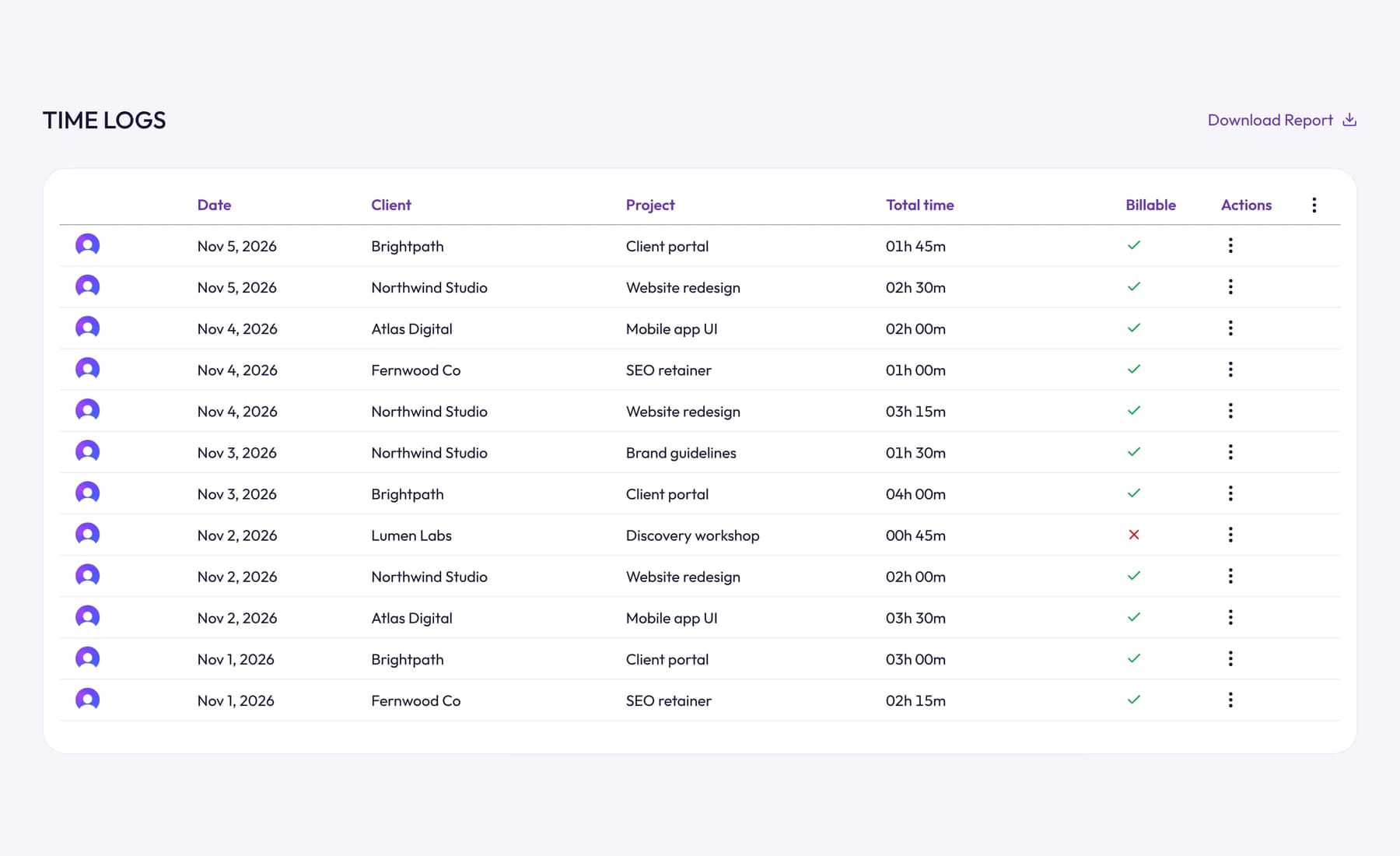
For the details of what's captured and when, see how tracking works. For a wider look at monitoring tools, see our roundup of Hubstaff alternatives.
Frequently asked questions
Can I use Upwork's time tracker for clients outside Upwork?
Upwork's desktop app is built to log time to Upwork contracts, and its protection and dispute rules only apply to work on the platform. For direct clients, use a separate time tracker and your own written terms.
How do I handle time I can't track on the computer?
Add it as a manual entry with a clear description: "Call with Sam about the checkout flow, 45 minutes". Say in your contract that manual time is billable when it's described, so it isn't treated as second-class.
Wrap up
Clients trust Upwork's Work Diary because of the system around it: a record, agreed rules and a referee. Off the platform, put the tracking policy in your contract, send a short report every week and make every invoice show the hours behind it. Add activity levels and screenshots only when a client needs them, with consent and deletion rules in writing.
To track time with optional screenshots and send reports with your invoices, see Tristiks Grow's time tracker with screenshots, free for 14 days.
Category: Time Tracking
Suraj Rao
Suraj Rao is the founder of Tristiks, the team behind Tristiks Grow and its desktop time tracker OneTrack. He writes about time tracking, client work and getting paid, and about DevOps, cloud and AI from years of building software.