How to Work With Clients in Different Time Zones
 By Suraj Rao11 min read
What You'll Learn
- Work out your overlap hours with each client, protect them for live calls, and do everything else in writing so work moves while one of you sleeps.
- Put your hours, reply times and the time zone for deadlines and billing in the contract. Write every deadline with a date, time and city.
- Daylight saving changes on different dates around the world, so the gap with a client can shift by an hour for weeks. Check your overlap each March, April, October and November.

To work with clients in different time zones, find the hours your working days overlap and keep them for live calls, then run everything else in writing. Put your working hours, reply times and the time zone that deadlines and invoices use in your contract, and write every deadline with a date, time and city. Check your overlap again whenever the clocks change, because countries change them on different dates.
Below: overlap tables for India to the US and the UK to Australia, the 2026 and 2027 daylight saving dates, a contract clause to copy, async habits, fair call scheduling, and how to bill time when your Tuesday is your client's Monday.
Step 1: Find your overlap hours
Overlap is the part of the day when you're both working. It's usually shorter than people expect, and sometimes it's zero. As Hubstaff's guide to managing time zones notes, finding common working hours is the hard part, so work it out once per client and share it.
Worked example: India and the US
A freelancer in Pune works 10:00 to 19:00 India Standard Time (IST, UTC+5:30). India doesn't use daylight saving, but the US does, so the gap changes twice a year.
| Client city | Gap (Nov to Mar) | Gap (Mar to Nov) | Good call window, client time | Same window in IST |
|---|---|---|---|---|
| New York | IST is 10h 30m ahead | IST is 9h 30m ahead | 9:00 to 10:30 a.m. | 19:30 to 21:00 (winter), 18:30 to 20:00 (summer) |
| San Francisco | IST is 13h 30m ahead | IST is 12h 30m ahead | 8:00 to 9:00 a.m. | 21:30 to 22:30 (winter), 20:30 to 21:30 (summer) |
With New York there's no natural overlap: the client starts as the freelancer finishes, so one side stretches a little for a short, fixed window. With San Francisco, it's your late evening or their late afternoon, which is your next morning.
Worked example: the UK and Australia
A freelancer in London works with a client in Sydney. Both countries use daylight saving, in opposite seasons, so the gap moves between 9 and 11 hours.
| Period (2027) | London | Sydney | Sydney is ahead by | Overlap option |
|---|---|---|---|---|
| To 28 Mar, and from 31 Oct | GMT | AEDT | 11 hours | London 07:00 to 08:00 = Sydney 18:00 to 19:00 |
| 28 Mar to 4 Apr, and 3 Oct to 31 Oct | BST | AEDT | 10 hours | London 07:30 to 08:30 = Sydney 17:30 to 18:30 |
| 4 Apr to 3 Oct | BST | AEST | 9 hours | London 08:00 to 09:00 = Sydney 17:00 to 18:00 |
A client in Brisbane is simpler: Queensland doesn't use daylight saving, so the gap is 10 hours in the UK winter and 9 in summer.
An hour of overlap is normal, and it moves.
The daylight saving traps (2026 and 2027 dates)
Most missed calls happen in the weeks when one country has changed its clocks and the other hasn't. The dates that matter most:
| Region | 2026 | 2027 | Rule |
|---|---|---|---|
| United States | Forward 8 Mar, back 1 Nov | Forward 14 Mar, back 7 Nov | 2:00 a.m. local, second Sunday in March to first Sunday in November (NIST) |
| UK | Forward 29 Mar, back 25 Oct | Forward 28 Mar, back 31 Oct | Last Sunday in March and October (GOV.UK) |
| EU | Same dates as the UK | Same dates as the UK | Changes at 01:00 UTC everywhere at once (Directive 2000/84/EC) |
| Australia (NSW, Victoria, ACT, Tasmania, South Australia) | Back 5 Apr, forward 4 Oct | Back 4 Apr, forward 3 Oct | First Sunday in April and October (timeanddate.com) |
The classic trap: New York is usually 5 hours behind London, but from 14 to 28 March 2027 and from 31 October to 7 November 2027 it's only 4 hours behind. A standing 15:00 London call is at 11:00 in New York for those weeks, not 10:00, and someone misses it.
Places that don't change their clocks
Most countries don't use daylight saving at all, according to Pew Research. India, China and Japan stay on standard time year-round, as do Queensland, Western Australia and the Northern Territory, Hawaii, and most of Arizona. Mexico ended daylight saving in 2022, except near the US border.
Rules also change. In July 2026 the US House passed the Sunshine Protection Act, which would make daylight saving time permanent, but at the time of writing the Senate hasn't, so the 2027 dates above still apply.
The habit that prevents this: add a calendar reminder for each clock change that affects a client, titled "Check call times with [client]".
Step 2: Put hours and response times in the contract
Time zone friction usually comes from assumptions: the client expects a reply "today", you think tomorrow is fine. Settle it in writing before work starts. Our guide to what a freelance contract should include covers the rest of the agreement, and setting client boundaries has more templates for working hours.
Here's a clause you can adapt:
Working hours, communication and time zones
My working hours are Monday to Friday, 10:00 to 19:00 India Standard Time (IST, UTC+5:30). I reply to emails within one working day.
Live calls take place between 9:00 and 10:30 a.m. New York time, which is 19:30 to 21:00 IST from November to March and 18:30 to 20:00 IST from March to November. Calls outside this window need 48 hours' notice.
Deadlines in this agreement are in New York time unless stated otherwise. Time is recorded and invoiced in IST, and each time entry is dated by its date in IST.
For urgent issues (the live site is down, a payment is blocked), message me on [channel]. I'll respond within [4] hours during my working hours.
Step 3: Write every deadline with a time zone
"End of day Friday" means three different moments in San Francisco, London and Manila, and your Friday 17:00 may already be the client's Saturday.
| Vague | Clear |
|---|---|
| EOD Friday | Friday 16 April 2027, 17:00 New York time |
| Monday 9 a.m. EST (in June) | Monday 7 June 2027, 9:00 a.m. New York time |
| By the 15th | By 23:59 on 15 June 2027, London time |
| First thing tomorrow | Before your 9:00 a.m. on Wednesday 3 March |
Use a city or "ET" rather than "EST", which is wrong all summer. Include the date as well as the day, and pick one time zone per project for deadlines, usually the client's.
Step 4: Build async habits
When you overlap for an hour, most work happens while the other side is asleep. Good written habits turn that into an advantage: send a question at the end of your day and wake up to the answer.
Doist, the company behind Todoist, has teammates across more than 18 time zones, so its people expect a response within 24 hours, not minutes. That's a reasonable default for client email too. Time zones are a real pain point: in Buffer's 2023 State of Remote Work survey, 14% of remote workers named working across time zones as their biggest struggle.
Habits that help:
- Make every message complete. "Quick question, can we chat?" costs a full day across time zones. Say what you need, why and by when.
- Record a short screen video to walk through a design instead of waiting for a call.
- Keep decisions in one place, such as the project thread, so nobody depends on a call they missed.
- Send an end-of-day update timed to land at the start of the client's day:
Update, Tue 2 Feb (sent 19:00 IST / 08:30 ET)

Done today: homepage layout, mobile menu
In progress: pricing page (about 60% done)
Need from you by 3 p.m. your time: final pricing copy
Next: pricing page, then contact form
Hours today: 6.5 (Website redesign, billable)
For more formats, see our client status update templates. If you run a team spread across countries, managing a remote team covers handoffs between people.
Step 5: Schedule calls fairly
Someone is always a little inconvenienced. Make it fair and visible:
- Agree one standing slot in the overlap window instead of negotiating each call.
- Rotate the awkward time on group calls, so the same person isn't always at 21:00.
- Always send a calendar invite. It converts the time for each person; an email that says "3 p.m." doesn't.
- Price out-of-hours calls if a client keeps asking for them. One 21:00 call a week is fine; five is a path to burnout.
A script for proposing the window:
"I'm in Pune, 10.5 hours ahead of you until March and 9.5 after. The easiest time for live calls is 9:00 to 10:30 a.m. your time, so let's keep our weekly check-in there. For everything else, send it over email and I'll reply before the start of your next working day."
Step 6: Record and bill time on the right date
Time zones raise billing questions most people only notice at month end: which date an entry belongs to, and which month late-night work falls into.
Use one rule for dates: where the work happened
The simplest rule: record and invoice time in your own time zone, dated by your local date, and say so in the contract, as in the clause above.
Freelancer in Bengaluru (IST, UTC+5:30), client in New York (EST, UTC-5)
Work session: Tue 2 Feb 2027 21:00 to Wed 3 Feb 00:30 IST

Your timesheet:     Tue 2 Feb  21:00-24:00   3h 00m
                    Wed 3 Feb  00:00-00:30   0h 30m
Client's view:      Tue 2 Feb  10:30-14:00   3h 30m (all on Tuesday)
The total is the same, but the days won't match the client's calendar. Say up front which time zone your timesheets use and nobody wonders why.
Month-end cut-offs
The edge cases bite on retainers and monthly invoices:
Freelancer in Sydney (AEDT, UTC+11), client in London (GMT, UTC+0)
Work: Mon 1 Mar 2027, 08:00-10:00 Sydney time
      = Sun 28 Feb 2027, 21:00-23:00 London time

Your records: March (bills on the March invoice)
Client's view: February
If a retainer includes "20 hours per calendar month", a time zone rule in the contract settles which month those 2 hours count against. See capacity retainers for retainer terms.
Invoice dates and due dates
- Date the invoice in your time zone, and write the due date as a full date ("due 17 March 2027"), not just "Net 15". See Net 30 payment terms for terms in general.
- Time the send so the invoice arrives in the client's morning, not their night.
- Allow for bank holidays on their side, which can delay an international transfer. See how to invoice international clients for currency and fees.
Check what your time tracker does
Trackers handle time zones differently. Toggl Track's reports use a separate reports time zone setting, and Clockify lets a workspace show entries in the original time zone or the viewer's. When you travel, check your device and account time zones match. Otherwise, the usual time tracking best practices apply: switch the timer when you switch clients and write a note on every entry.
Tools that help
- See the client's time at a glance: Google Calendar's secondary time zone and world clock. On the web, Google added a third time zone in September 2026.
- Pick a time across several cities: a meeting planner such as World Time Buddy or timeanddate.com's.
- Let clients book a slot: a scheduling tool that shows open times in the client's own time zone.
How Tristiks Grow helps
Tristiks Grow covers the tracking and billing side of working across time zones:
- Time tracked as you work, with the desktop app (macOS, Windows and Linux) running in the background and tracking offline, or the web timer. Each entry has a client, project, task, note and billable status.
- Timesheets with hours per day and reports by client and project, so you can show a client what was done and when.
- Invoices from tracked hours in the client's currency, with scheduled sends so the invoice arrives in their morning, and payment reminders before and after the due date.
- Google Calendar integration, which shows task due dates and invoice dates next to your calendar events.
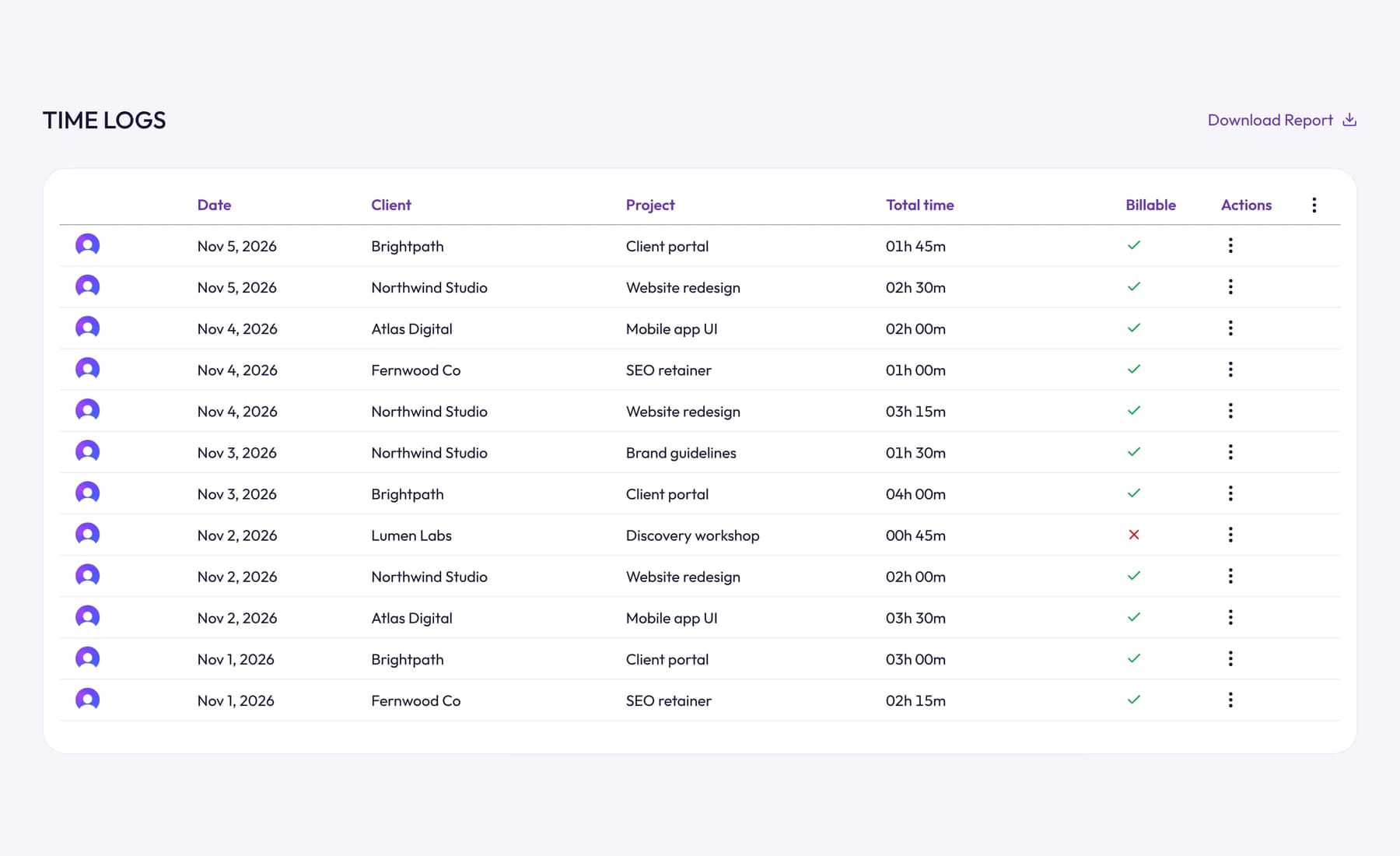
Tristiks Grow doesn't offer booking links, so use a separate scheduling tool for those. See our time tracking for remote teams page.
Frequently asked questions
How many hours of overlap do I need with a client?
For most freelance projects, one hour a few days a week is enough, as long as everything else is written. If the client wants daily live collaboration, agree a longer window and price in the odd hours.
Should I work in my client's time zone?
Only if it's sustainable. Shifting your whole day can work for a short, intense project. For long-term clients, a fixed overlap window plus good async habits is healthier and works as well.
Which time zone should I use on my invoices and timesheets?
Your own, unless the contract says otherwise. Record each entry by your local date and state that rule in the contract, so a client comparing dates knows why late-night work shows up a day later on your timesheet.
Wrap up
Working with clients in different time zones comes down to a few written agreements: a fixed overlap window, reply times, one time zone for deadlines and one for billing. Add async habits, a reminder before each clock change, and time records dated where the work happened.
To track time against each client and send invoices that land in their morning, try Tristiks Grow free for 14 days.
Category: Time Tracking
Suraj Rao
Suraj Rao is the founder of Tristiks, the team behind Tristiks Grow and its desktop time tracker OneTrack. He writes about time tracking, client work and getting paid, and about DevOps, cloud and AI from years of building software.