How to Track Time for Multiple Clients (Without Losing Hours)
 By Suraj Rao7 min read
What You'll Learn
- Set up one structure everyone follows: client, then project, then task, with each client's rate and billing type saved once, so every entry lands in the right place.
- Switch the timer whenever you switch clients, log small tasks in a daily catch-all per client, and write a short note on every entry. Reconstructing a day from memory loses hours.
- Batch clients into blocks to cut switching, and review the week every Friday so each client's hours are complete and correct before they reach an invoice.

To track time for multiple clients, give every entry the same three labels (client, project and task), save each client's rate once so billing is automatic, and switch the timer every time you switch clients rather than reconstructing the day later. Log small interruptions to a catch-all task for that client, write a short note on each entry, group work for the same client into blocks to cut down on switching, and review the week before it turns into invoices.
The hardest part of working with several clients isn't the work, it's the seams between them: the five-minute email to client A in the middle of client B's project, the call that ran long, the afternoon you forgot to stop the timer. This guide covers how to set up your tracking, the rules that stop hours leaking, why switching is so costly and a weekly review that makes invoicing quick.
Why multiple clients make tracking harder
- More switches, more forgotten timers. Every change of client is a chance to forget to stop one timer or start the next.
- Small tasks fall through. Quick replies and five-minute fixes feel too small to log, but they add up to hours a week.
- Different rules per client. One is hourly, one is on a retainer, one is fixed-price; one bills travel, another doesn't.
- Switching itself costs time. Researcher Gloria Mark found that interrupted work took an average of about 23 minutes to resume, and that people switched what they were doing every few minutes. The American Psychological Association summarises research showing that switching between tasks costs time and focus.
You can't remove the switches, but you can make sure every one is recorded and cut the number you make.
Step 1: Set up one structure
Decide the structure once and use it for everything:
Client          -> who pays
  Project       -> a piece of work with its own budget or scope
    Task        -> what you were doing
      Entry     -> start, end, note, billable or not
For example:
Brightpath Clinics
  Website redesign
    Design: homepage
    Client calls
    Admin and email
  Monthly care plan
    Updates and fixes
A few rules keep it clean:
- Name clients by their legal or invoice name, so time and invoices match.
- Create a project for each retainer or contract, not one giant project per client. Budgets and reports then make sense.
- Give every client an "Admin and email" task. That's where small things go.
- Keep the task list short. Five to eight tasks per project is enough. Too many and you'll stop choosing carefully.
Step 2: Save each client's billing rules once
Set these on the client, not on each entry:
- hourly rate and currency
- billable by default or not
- billing type: hourly, retainer or fixed price
- tax rate and payment terms
If you charge different rates for different kinds of work, say design and strategy, set the rate on the project. Our guide to charging different rates for different clients covers when that's worth it.
Step 3: Follow four rules every day
Switch the timer when you switch clients
This is the rule that matters most. When you move from client A to client B, stop A and start B, even if you'll be back in ten minutes. A desktop timer that sits in your menu bar or taskbar makes it two clicks.
Log small tasks to a catch-all
For a two-minute reply, don't start and stop a timer. Keep a running list on paper or in a note, and at the end of the day add one entry per client to their "Admin and email" task with the total. Whether you bill it depends on your agreement; our guide to billable vs non-billable hours helps you decide. But log it either way, so you can see what each client really costs.
Write a note on every entry
"Homepage hero: 2 layout options" takes five seconds and answers the client's "what was this?" months later. Notes also make invoices clearer, and clear invoices get paid faster.
Don't reconstruct the day from memory
Filling in a timesheet on Friday from memory almost always under-counts. If you forgot the timer, add a manual entry as soon as you notice, while you still remember. Our guide to filling out a timesheet covers manual entries.
Step 4: Cut the number of switches
Tracking every switch is good; making fewer of them is better.
- Give clients their own blocks. Mornings for client A, afternoons for client B, or whole days per client if your work allows. Time blocking shows how to plan it.
- Batch email and messages. Check them at set times, two or three times a day, and reply to all clients in one go.
- Group calls on the same days, so your focus days stay free.
- Use focused sessions for deep work. The Pomodoro technique works well as long as you log the session to one client.
Fewer switches means fewer forgotten timers, less lost focus and less of the tiredness that comes with scattered days. Our post on freelance burnout covers why that matters.
Step 5: Handle the tricky cases
| Situation | What to do |
|---|---|
| A call covers two clients | Split the time between them, with a note on each entry |
| Work that helps several clients, such as building a template | Log it as non-billable to your own business, or agree upfront who pays |
| Travel for a client | Log it to that client; bill it if your contract says so |
| A retainer client | Track hours against the retainer project, to see if the retainer is priced right |
| A fixed-price project | Track anyway, as non-billable, to know your effective hourly rate |
| You left the timer running | Edit the entry as soon as you notice; idle detection catches most of these |
Tracking fixed-price and retainer work is what tells you whether those deals are profitable. Our guide to capacity retainers shows how to use the hours to reprice.
Step 6: Review the week on Friday
Fifteen minutes every Friday keeps everything accurate before it reaches a client:
- Scan for gaps in each day. Did you really do nothing from 2pm to 4pm on Wednesday?
- Check for overlaps where two timers ran at once.
- Fix the labels on entries that went to the wrong client or task.
- Fill in missing notes while you still remember.
- Compare each client's hours against their budget or retainer. If one is running over, tell the client now, not on the invoice.
Then invoicing is just choosing a client and a date range. Our guide to time tracking best practices has more on keeping records clean.
Which method to use
| Method | Accuracy | Best for |
|---|---|---|
| Desktop timer | High | Most freelancers and teams |
| Browser timer | High | When you work in the browser and don't need a desktop app |
| Calendar blocks turned into entries | Medium | Days of meetings |
| Manual entries at the end of the day | Medium | Occasional catch-ups |
| Reconstructing the week from memory | Low | Avoid |
Our comparison of seven ways to track your time at work goes through each in more detail.
How Tristiks Grow helps
Tristiks Grow is built around the client, project and task structure:
- Timers on the desktop or in the browser, against a client, project and task. The desktop app for macOS, Windows and Linux runs in the background and keeps tracking offline.
- Manual entries for the time you forgot to track.
- Rates, currency, tax and payment terms saved on each client, so tracked hours become invoice lines at the right rate.
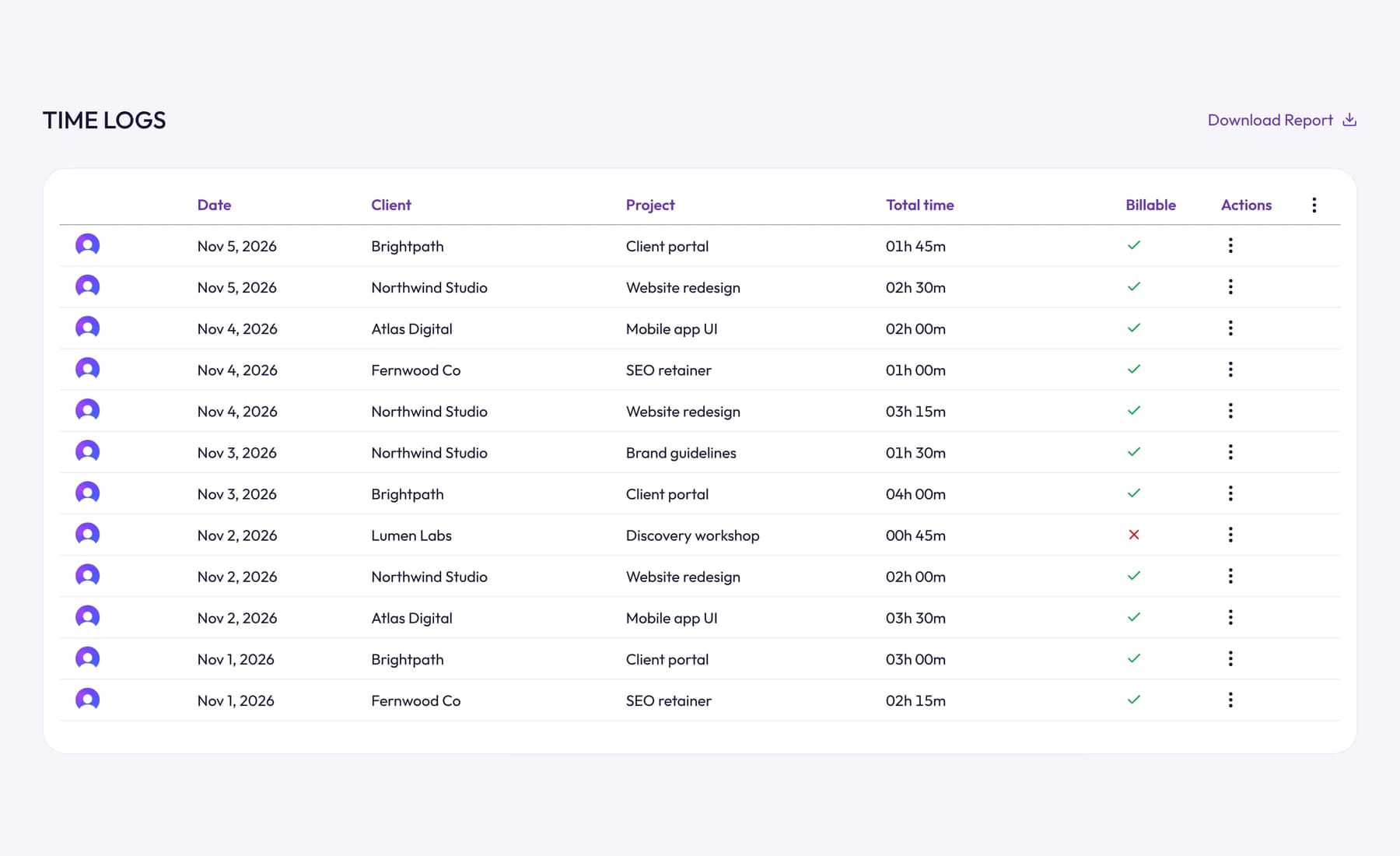
- A time log by date, client and project, with billable status, to review the week and export as CSV.
- Invoices from unbilled hours for a date range in one click; entries already billed are locked.
See project time tracking and time tracking for freelancers for more.
Frequently asked questions
Should I use a separate time tracker for each client?
No. Clients sometimes ask you to use their tool, but keep your own records in one place as well, so you can see your whole week and invoice consistently. If a client's tool is required, log in both or export from yours.
How do I bill a few minutes of work?
Decide a minimum billing increment, such as 6 or 15 minutes, and put it in your contract. Log the real time either way. Our guide to calculating hours worked covers rounding.
How many clients is too many?
There's no fixed number, but if you're working on more than three or four clients most days, switching costs and admin start to eat into your billable time. Your time log will show it.
Wrap up
Tracking time for several clients comes down to one structure and a few habits: client, project and task on every entry; rates saved once per client; switch the timer when you switch clients; log small tasks to a catch-all; and review every Friday. Cut the switches you can, and every hour you work will make it to the right invoice.
To track every client's hours and turn them into invoices in a few clicks, try Tristiks Grow free for 14 days.
Category: Time Tracking
Suraj Rao
Suraj Rao is the founder of Tristiks, the team behind Tristiks Grow and its desktop time tracker OneTrack. He writes about time tracking, client work and getting paid, and about DevOps, cloud and AI from years of building software.